What Is Conversion Tracking in Performance Marketing? A Complete Guide (2026)
Conversion tracking measures the actions users take after clicking your ads. Learn how Google Ads, Meta Ads, GA4, GTM, and server-side tracking work, plus how to set them up and fix common mistakes.

- 01What is conversion tracking?
- 02Why conversion tracking matters
- 03Types of conversions
- 04How conversion tracking works
- 05Google Ads conversion tracking setup
- 06Meta Ads (Facebook & Instagram) conversion tracking
- 07Google Analytics 4 conversion tracking
- 08Google Tag Manager for conversion tracking
- 09Server-side tracking and Conversion API
- 10Attribution models explained
- 11Common conversion tracking mistakes
- 12How to test and verify conversion tracking
- 13Key conversion tracking metrics and KPIs
- 14Privacy changes and the future of tracking
- 15Conversion tracking checklist
We'll email you our Performance Marketing Setup Checklist instantly.
No spam. Unsubscribe anytime.
If you've ever run ads and wondered whether the money actually came back as sales or leads, you were missing one thing: conversion tracking. This guide explains what is conversion tracking, why it sits at the heart of performance marketing, and exactly how to set it up across Google Ads, Meta Ads, Google Analytics 4, and Google Tag Manager.
What is conversion tracking?
Conversion tracking is the process of recording the valuable actions people take after interacting with your marketing and connecting those actions back to the source.
That source could be a Google Search keyword, a Meta ad creative, a YouTube video, or an email. The action could be a purchase, a lead form, a phone call, a download, or a custom event like "watched 75% of demo video."
In traditional advertising, you bought reach and hoped it worked. In performance marketing, you buy outcomes — and conversion tracking is the receipt. It is the reason you can say "I spent ₹10,000 and got 47 leads at ₹213 per lead" instead of "I think the campaign did okay."
If you can't name the exact action you're paying for, you aren't running performance marketing. You're running branding with a conversion pixel bolted on.
Why conversion tracking matters
Conversion tracking matters because every other decision in performance marketing depends on it:
- It proves ROAS. You can't calculate return on ad spend unless you know how much revenue the ads produced. See our ROAS formula guide for the exact math.
- It trains the algorithm. Google Ads and Meta Ads use conversion data to find lookalike audiences and optimize bidding. Bad data means bad optimization.
- It stops waste. Without tracking, you keep spending on placements, keywords, and audiences that never convert.
- It enables attribution. You learn which touchpoints actually drive results instead of giving all credit to the last click.
- It protects margins. Knowing your true CPA and CPL lets you scale only what is profitable.
A D2C brand in India we worked with discovered that 35% of their "purchases" were duplicate conversions from an untested tag. Once fixed, their real CPA dropped by 28% and they could scale confidently.
Types of conversions
Not every conversion is a sale. Smart performance marketers track the full funnel:
| Type | Examples | When to use |
|---|---|---|
| Macro conversion | Purchase, qualified lead, booked demo, subscription | Primary business outcome; optimize bidding here |
| Micro conversion | Add-to-cart, page scroll, video watch, email signup | Early signal of intent; use for retargeting and funnel diagnosis |
| Online conversion | Ecommerce purchase, form submit, webinar signup | Directly trackable on your website or app |
| Offline conversion | Phone sale, in-store visit, CRM-qualified lead | Import via offline conversion import or CRM integration |
| Custom conversion | "Pricing page viewed," "Tool used for 2 minutes" | Unique to your business model or funnel stage |
Track micro conversions to understand the journey, but let the algorithm optimize toward macro conversions. Otherwise you train it to find people who scroll, not people who buy.
How conversion tracking works
The basic data flow is the same across every platform:
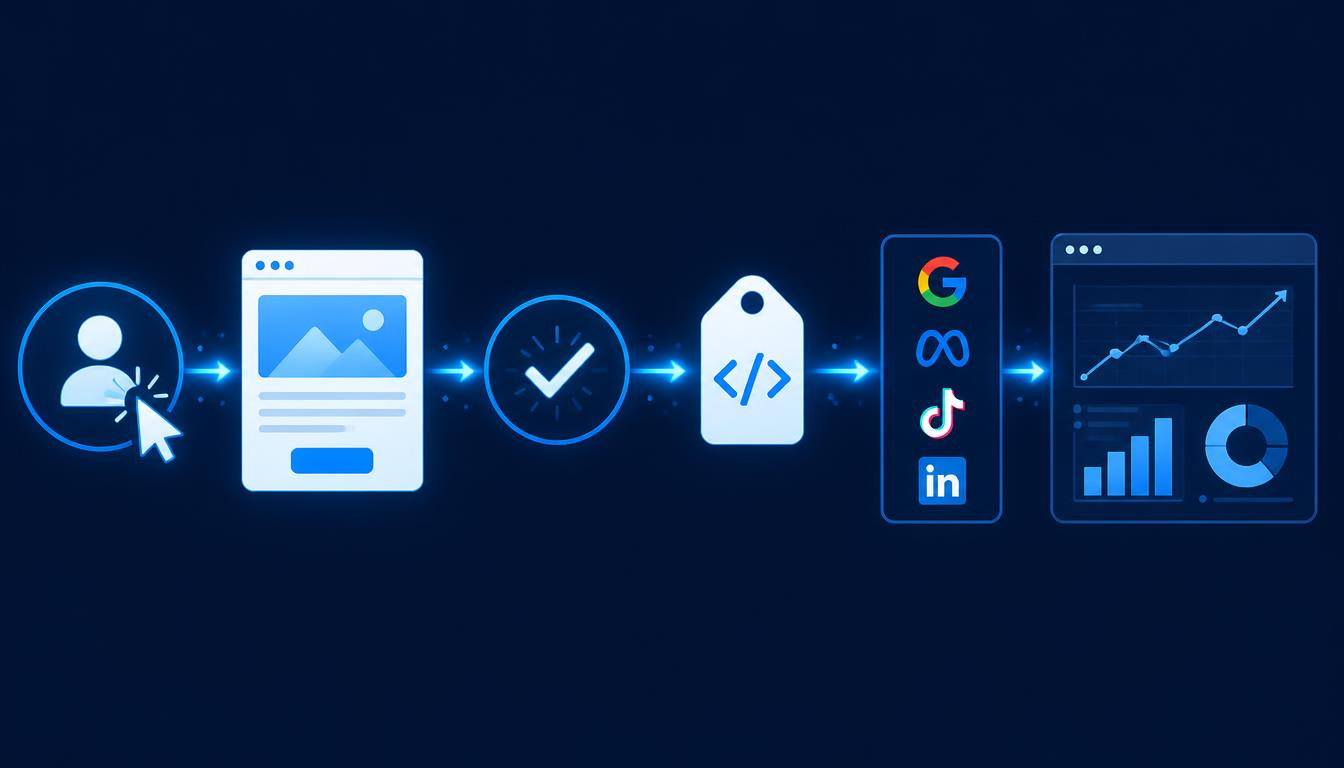
- User sees or clicks an ad — the platform records the click and attaches an identifier.
- User lands on your site — the platform's pixel or tag loads and recognizes the visitor.
- User completes an action — they buy, sign up, call, or download.
- The conversion tag fires — a piece of code sends the event back to the platform.
- The platform attributes the conversion — it matches the event to the original click or view.
- You see it in reporting — conversions, cost per conversion, conversion value, and ROAS.
That flow works perfectly until it doesn't. iOS 14.5+, browser privacy features, ad blockers, and cookie deletion have broken the browser-only model. That's why server-side tracking is now essential.
Google Ads conversion tracking setup
Google Ads uses the Google tag (formerly global site tag) to track conversions.
Step-by-step setup
- Create a conversion action in Google Ads under Tools & Settings → Conversions → New conversion action → Website.
- Install the Google tag across every page. Best done through Google Tag Manager.
- Add the conversion event tag that fires on the thank-you page or on a custom event.
- Set the value and currency — use dynamic values for ecommerce, static values for lead gen.
- Enable Enhanced Conversions to send hashed email/phone and improve match rates.
- Verify in Google Ads under the conversion action's status column.
Key Google Ads conversion settings
| Setting | What it controls | Recommendation |
|---|---|---|
| Count | One or every conversion per click | One for leads; every for sales |
| Conversion window | How long after a click to attribute | 30–90 days depending on sales cycle |
| Attribution model | How credit is split across clicks | Data-driven attribution (default) |
| Enhanced Conversions | Sends hashed first-party data | Enable for better accuracy |
For a deeper dive into Google Ads measurement, see our Google Ads course page.
Meta Ads (Facebook & Instagram) conversion tracking
Meta tracks conversions through the Meta Pixel and Conversions API (CAPI).
Meta Pixel
The Pixel is a browser-based JavaScript snippet. It tracks:
- PageView
- ViewContent
- AddToCart
- InitiateCheckout
- Purchase
- Lead
- CompleteRegistration
You install it once, then fire standard events on the right pages or actions.
Conversions API (CAPI)
CAPI sends events directly from your server to Meta. It is not a replacement for the Pixel — it works alongside it. The Pixel catches browser events; CAPI catches server events. Meta deduplicates them using event_id and f_event_id.
Why you need both
| Approach | Strengths | Weaknesses |
|---|---|---|
| Pixel only | Easy to set up, rich event data | Blocked by iOS 14.5+, ad blockers, cookie deletion |
| CAPI only | Reliable, privacy-resistant | Requires server access, harder to set up |
| Pixel + CAPI | Best of both worlds | Slightly more complex, but standard practice in 2026 |
A coaching business running Meta Ads in India saw a 22% increase in reported purchases after adding CAPI, simply because lost browser events were recovered.
Google Analytics 4 conversion tracking
GA4 is event-based. Almost everything is an event, and you mark the most important ones as key events (formerly conversions).
How it differs from Universal Analytics
- No more "goals." You create events and mark key events.
- Every event can carry parameters like value, currency, and product details.
- Attribution is more flexible but also more complex.
Setting up key events
- Make sure the GA4 tag is installed (usually via GTM).
- Create an event in GA4 Configure → Events, or fire it from GTM.
- Toggle "Mark as key event" in GA4 Configure → Key events.
- See conversions in the Engagement and Advertising reports.
GA4 is often your single source of truth for cross-platform reporting, but remember: platform attribution differs from GA4 attribution. Use platform numbers to optimize inside the platform, and GA4 numbers to report to stakeholders.
Google Tag Manager for conversion tracking
Google Tag Manager is the control center for most conversion tracking setups.
Why use GTM
- Marketers can add or update tags without developer help.
- You can manage Google Ads, GA4, Meta Pixel, and third-party tags in one place.
- Triggers and variables let you fire tags precisely — only when they should fire.
- Preview mode makes testing easy.
Common GTM triggers for conversions
| Trigger type | Use case |
|---|---|
| Page view | Thank-you page after form submission |
| Form submission | Native form submit event |
| Element visibility | Success message that appears without a page change |
| Custom event | Data-layer event pushed by your developer |
| Click | Button clicks like "Add to Cart" or "Call Now" |
If you're serious about performance marketing, learn GTM before you learn advanced bidding. Bad data makes every bid wrong.
Server-side tracking and Conversion API
Browser tracking has become unreliable. iOS 14.5+ requires app tracking permission, Safari limits third-party cookies, and ad blockers are mainstream. Server-side tracking fixes this.
How server-side tracking works
Instead of the user's browser sending data to Google or Meta, your own server sends it. The server has access to first-party data (email, phone, order ID) that the browser may not.
Meta Conversions API setup paths
- Direct integration — your developer sends events from your backend.
- Partner integration — Shopify, WooCommerce, and other platforms have native CAPI plugins.
- GTM server-side container — route browser data through your own tagging server.
Google Enhanced Conversions
Enhanced Conversions works similarly for Google Ads. You send hashed customer data (email, phone, name, address) with your conversion events to improve match rates and recover lost conversions.
If you run lead-gen campaigns and are not using Enhanced Conversions or CAPI, you are likely under-reporting results by 20–40%.
Attribution models explained
Attribution decides who gets credit for a conversion. Different platforms use different models, which is why your Google Ads ROAS, Meta ROAS, and GA4 revenue rarely match.
Common attribution models
| Model | How it works | Best for |
|---|---|---|
| Last-click | 100% credit to the last click | Simple funnels, quick purchases |
| First-click | 100% credit to the first click | Brand discovery, long cycles |
| Linear | Equal credit to every touchpoint | Multi-touch awareness |
| Data-driven | Machine-learned credit split | Most advertisers today |
| View-through | Credit for ad impressions even without clicks | Meta retargeting, display |
Don't chase identical numbers across platforms. Pick one source of truth for business reporting (usually GA4 or your data warehouse) and use platform numbers only to optimize inside that platform.
Common conversion tracking mistakes
Even experienced marketers make these errors:
- Duplicate conversions — firing the purchase event twice because both the Pixel and a hardcoded tag send it.
- Wrong trigger — tracking a page view instead of the actual conversion action.
- Missing mobile events — testing only on desktop while most traffic is mobile.
- No value passed — sending "1 conversion" without revenue, so ROAS can't be calculated.
- Ignoring conversion lag — pausing a campaign before delayed conversions come in.
- Never testing — going live without GTM Preview, GA4 DebugView, or Meta Event Manager.
- Attribution window mismatch — comparing 7-day click data with 30-day click data.
Fix the measurement before you fix the creative. A great ad with broken tracking looks like a failure.
How to test and verify conversion tracking
Testing is not optional. Here is the minimum checklist before scaling budget:
- Open GTM Preview mode and visit your site. Confirm the base tag loads on every page.
- Complete a test conversion — fill the form, complete the purchase, or make the call.
- Check that the conversion tag fires once in GTM Preview.
- Open GA4 DebugView and confirm the event appears with the right parameters.
- Open Meta Event Manager and confirm the event is received with a good event match quality.
- Wait 15–30 minutes and check Google Ads, Meta Ads Manager, and GA4 reports.
- Compare numbers — small differences are normal; large gaps mean a setup problem.
If you see a conversion in GTM Preview but not in the platform, the issue is usually attribution window, match quality, or ad-blocker loss.
Key conversion tracking metrics and KPIs
Once tracking is clean, these metrics become useful:
| Metric | Formula | What it tells you |
|---|---|---|
| Conversion Rate (CVR) | Conversions ÷ Clicks | Landing page and offer quality |
| Cost Per Lead (CPL) | Ad spend ÷ Leads | Lead-gen efficiency |
| Cost Per Acquisition (CPA) | Ad spend ÷ Conversions | Overall campaign efficiency |
| Return on Ad Spend (ROAS) | Revenue ÷ Ad spend | Revenue efficiency |
| Conversion value | Revenue per conversion | Helps algorithm optimize toward value |
| View-through rate | View-through conversions ÷ Impressions | Brand-assisted conversions |
For ROAS specifically, read our ROAS formula explained guide.
Privacy changes and the future of tracking
The tracking landscape is changing fast:
- iOS 14.5+ made app tracking opt-in, reducing mobile web signal.
- Safari's ITP limits third-party cookies and shortens first-party cookie life.
- Ad blockers prevent pixels from loading for a growing share of users.
- Third-party cookie deprecation in Chrome will further reduce browser-based tracking.
- Privacy regulations like GDPR and India's DPDP Act require consent for many tracking activities.
The response is clear: collect first-party data, use server-side tracking, implement consent mode, and build measurement around your own CRM and data warehouse, not just platform pixels.
Conversion tracking checklist
Copy this checklist for every new campaign:
- Defined macro and micro conversions
- Assigned values to each conversion
- Installed base tag across all pages
- Created conversion actions in Google Ads
- Set up Meta Pixel standard events
- Implemented Meta Conversions API
- Enabled Google Enhanced Conversions
- Configured GTM triggers and variables
- Tested in GTM Preview, GA4 DebugView, and Meta Event Manager
- Confirmed no duplicate conversions
- Set correct attribution windows
- Documented one source of truth for reporting
If you want hands-on practice with real campaigns, join our AI-Powered Performance Marketing Course. The 6-week live programme covers GTM, GA4, Google Ads tracking, Meta CAPI, and server-side measurement with live projects.
Glossary
- Conversion
- Any valuable action a user takes after interacting with your marketing. Examples include purchases, leads, calls, downloads, and sign-ups.
- Pixel
- A small piece of JavaScript code placed on a website that loads when a page opens and reports visits and events back to an ad or analytics platform.
- Tag
- A snippet of code — often managed in Google Tag Manager — that fires based on a trigger and sends data to a third-party platform.
- Trigger
- A rule in GTM that decides when a tag should fire, such as a page view, button click, form submission, or custom data-layer event.
- Attribution
- The rules that decide which touchpoint gets credit for a conversion. Common models include last-click, first-click, data-driven, and view-through.
- CAPI (Conversions API)
- Meta's server-side tracking solution that sends conversion events directly from your server to Meta, bypassing browser restrictions and ad blockers.
- Enhanced Conversions
- Google Ads feature that hashes and sends first-party data like email and phone to improve conversion measurement accuracy.
- First-party data
- Data you collect directly from your audience — emails, phone numbers, purchase history, and on-site behavior — which becomes more valuable as third-party cookies decline.
- Consent mode
- Google's framework that adjusts tag behavior based on a user's cookie consent choice, helping maintain measurement while respecting privacy.
- Conversion lag
- The delay between a click and the reported conversion. Some conversions happen hours or days later, so recent ROAS can look artificially low.
Sources & Further Reading
Frequently Asked Questions
What is conversion tracking in simple terms?+
Conversion tracking is the system that records what people do after clicking your ad — whether they buy, sign up, call, or download — and tells you which campaign or keyword caused it. Without it, you know how much traffic you bought but not whether it made money.
Why is conversion tracking important in performance marketing?+
Performance marketing only works if you can tie spend to results. Conversion tracking lets you calculate ROAS, CPA, and CPL, optimize algorithms toward real business goals, and pause budget that isn't driving outcomes. It turns advertising from guesswork into a measurable investment.
What are the main types of conversions?+
Macro conversions are the primary business goals — purchases, qualified leads, or booked appointments. Micro conversions are smaller steps toward those goals — add-to-cart, page scroll, video watch, or email signup. Both help you understand and optimize the funnel.
What is the difference between Google Ads conversion tracking and Meta conversion tracking?+
Google Ads tracking focuses on search, shopping, display, and YouTube intent, often tied to keywords and landing pages. Meta tracking focuses on social identity and behavior across Facebook, Instagram, and Audience Network, with strong retargeting and view-through attribution. Both now recommend server-side backup.
Do I need Google Tag Manager for conversion tracking?+
You don't strictly need it, but it is the standard way to manage tags at scale. GTM lets marketers add, update, and test conversion tags without waiting on developers, and it is the easiest place to implement triggers, variables, and consent mode.
What is server-side conversion tracking?+
Server-side tracking sends conversion data directly from your server to the ad platform, instead of relying on a browser pixel. Meta's Conversions API and Google's Enhanced Conversions are the main examples. It is more reliable because it isn't blocked by iOS restrictions, ad blockers, or cookie deletion.
What are common conversion tracking mistakes?+
The most common mistakes are firing the same conversion twice, tracking page views instead of real events, missing mobile or app conversions, setting the wrong attribution window, and never testing tags in preview mode. Each of these can make a winning campaign look like a loser.
How do I test if conversion tracking is working?+
Use Google Tag Manager Preview mode to see tags fire in real time, GA4 DebugView to verify event parameters, and Meta Event Manager to check event reception and match quality. Complete a test conversion yourself and confirm the platform reports it.
How long does it take for conversions to show in Google Ads or Meta?+
Most conversions appear within minutes, but conversion lag can stretch to hours or days depending on your sales cycle. Recent ROAS will almost always improve as more conversions are attributed back. Don't judge a campaign's performance in the first 24–48 hours.
How do I learn conversion tracking from scratch?+
Start with Google Tag Manager and GA4, then add Google Ads and Meta Pixel events. Run a small real campaign so you can see actual data. A structured live course like PMAcademy's 6-week programme covers GTM, GA4, Google Ads tracking, Meta CAPI, and server-side setup with real projects.
Join our live training program and become a performance marketing professional.