Couple Prompt for Gemini AI: 60+ Copy-Paste Prompts (2026)
60+ copy-paste Gemini AI couple photo prompts — retro saree, romantic, pre-wedding, vintage and 3D styles — plus the exact step-by-step process to edit any couple photo in Gemini.
- 01What Gemini can and cannot do with couple photos
- 02The seven-part couple prompt formula
- 03Step-by-step: making a couple photo in Gemini
- 04Build your own couple prompt
- 0564 Gemini AI couple photo prompts
- 06Seven mistakes that ruin Gemini couple photos
- 07Gemini vs other tools for couple photos
- 08How marketers use couple prompts
- 09Before you post: the checklist
- 10Test yourself
- 11Safety, consent and honesty
- 12Where to go next
We'll email you our Performance Marketing Setup Checklist instantly.
No spam. Unsubscribe anytime.
Most people type "make a romantic couple photo" into Gemini, get back two strangers who vaguely resemble them, and give up. The prompt is the problem, not the model.
A couple prompt is a brief for a photographer who cannot see your relationship, your outfits or your intent. Write it properly and the results are repeatable. This guide gives you the structure, 64 copy-paste prompts, a builder that writes the prompt for you, and an honest list of what Gemini still gets wrong on couple photos.
What Gemini can and cannot do with couple photos
It is genuinely good at:
- Swapping outfits — sarees, lehengas, sherwanis, suits — while keeping the pose
- Replacing backgrounds, including rooftops, temples, beaches and streets
- Relighting a flat indoor photo as golden hour, candlelight or window light
- Restyling into film, anime, watercolour or 3D looks
- Restoring old, faded and torn couple photographs
- Combining two separate photos into one frame
It is still unreliable at:
- Reproducing both faces exactly — two faces means two chances to drift
- Interlocked hands and fingers
- Fine jewellery detail — mangalsutra, kalire, nose rings
- Small legible text on clothing, signage or invitations
- Genuine resolution: upscaling invents detail rather than recovering it
Important: treat every output as a draft you inspect at full zoom. On couple photos, the failures hide in faces, hands and jewellery.
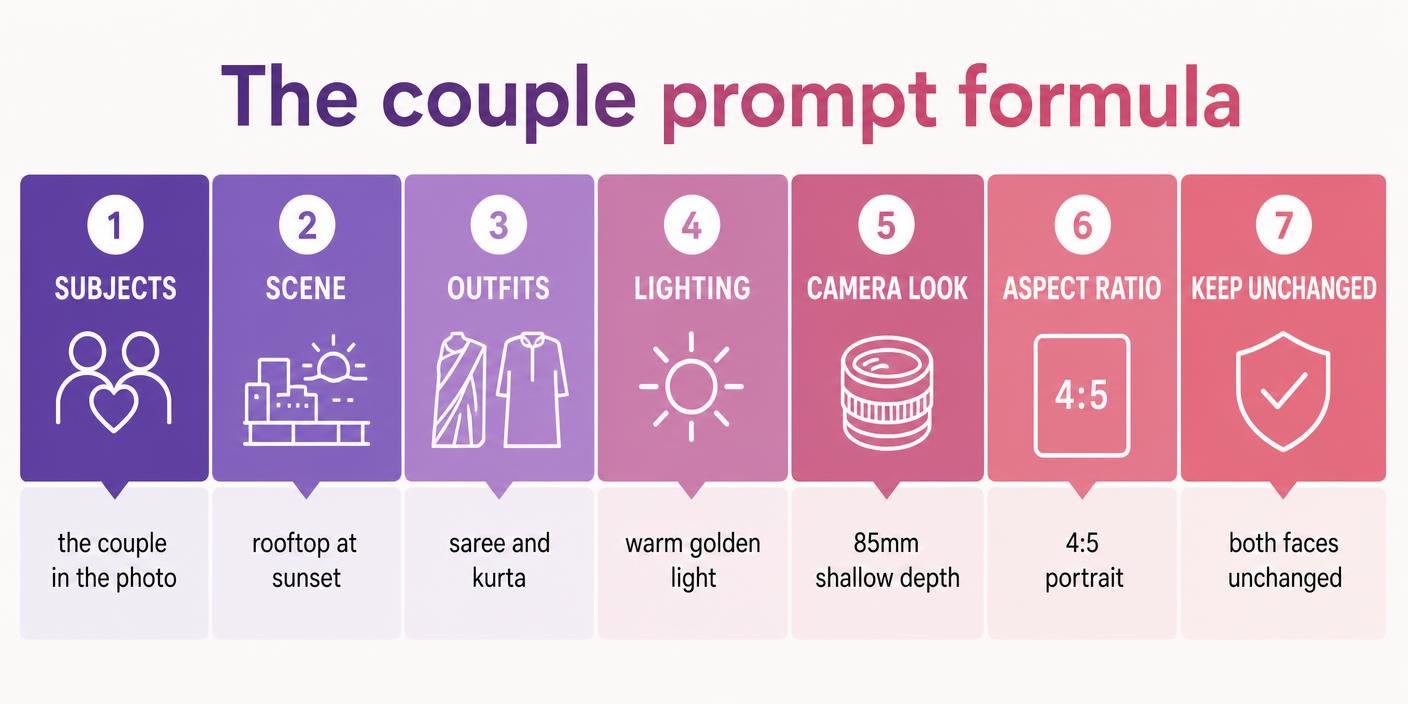
The seven-part couple prompt formula
Every prompt in this article follows the same structure:
[Subjects] + [Scene] + [Outfits] + [Lighting] + [Camera look] + [Aspect ratio] + [Keep unchanged]
Here is the difference it makes.
Weak prompt: "Make a romantic retro couple photo."
Strong prompt: "Edit the attached photo of the couple into a warm retro portrait. Dress the woman in a deep red Banarasi silk saree with a gold border and the man in a cream kurta. Warm golden light from one side, soft film grain. Plain warm-toned wall behind them, softly blurred. 85mm lens look, 4:5 portrait. Keep both faces, skin tones and hairstyles exactly as in the original photo, change nothing else."
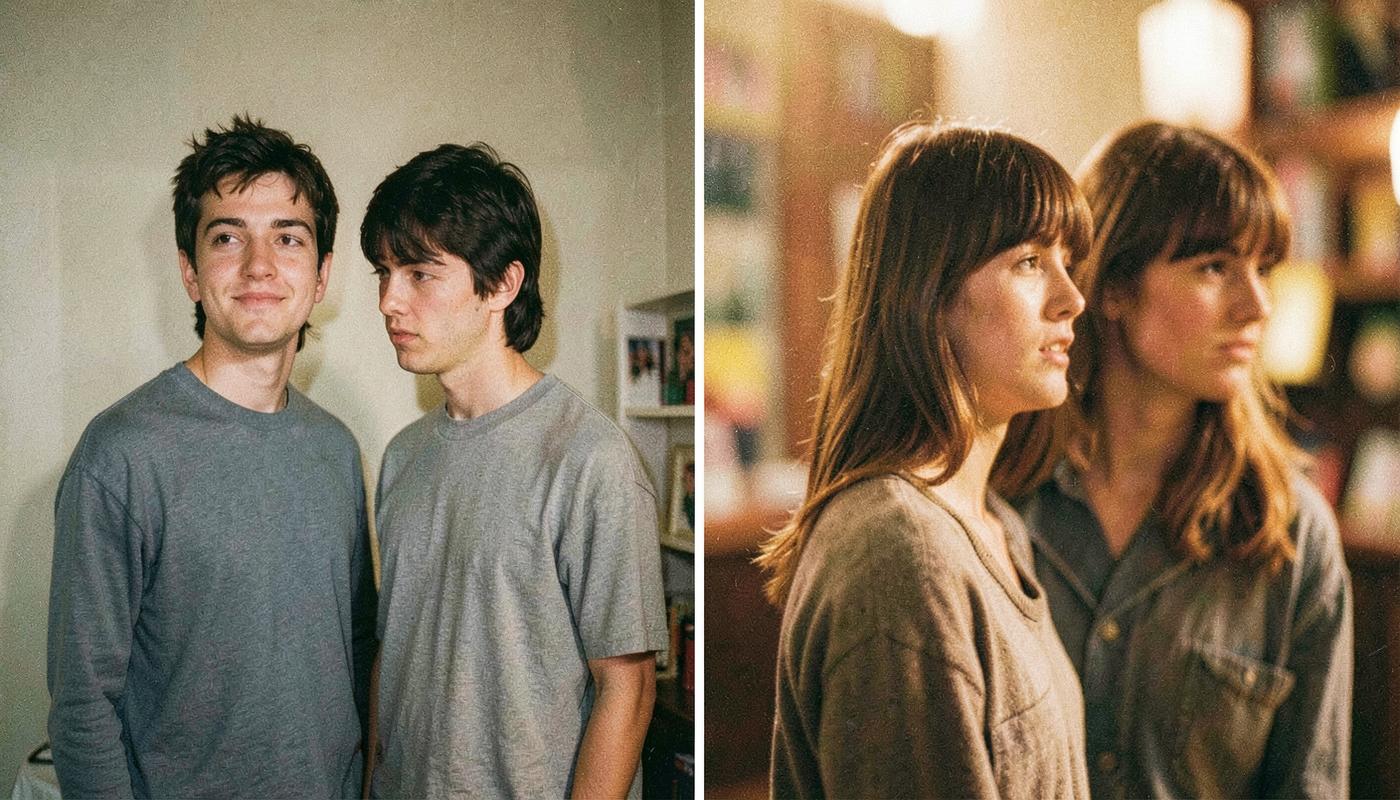
The last clause does most of the heavy lifting. Without "keep both faces exactly as in the original", Gemini treats the faces as fair game and quietly redraws them — the failure people call likeness drift.
Step-by-step: making a couple photo in Gemini
- Start a new chat. Old references from a previous photo bleed into new results.
- Upload the original. Full resolution from the camera roll — not a screenshot, not a WhatsApp forward. Gemini cannot restore detail that compression already threw away.
- Describe both people. "The couple in the attached photo — the woman on the left, the man on the right." This stops the edit applying to only one of them.
- Ask for one style. Retro or rain or pre-wedding. Stacking three styles is the single biggest cause of distorted output.
- Name outfits, scene and lighting. One short phrase each.
- Add a camera look and the ratio. "85mm lens, shallow depth of field" plus 4:5 for feed, 9:16 for Reels.
- Lock the faces. End with the preservation clause. Always.
- Iterate in the same chat. "Same image, only fix the hands" beats rewriting the prompt.
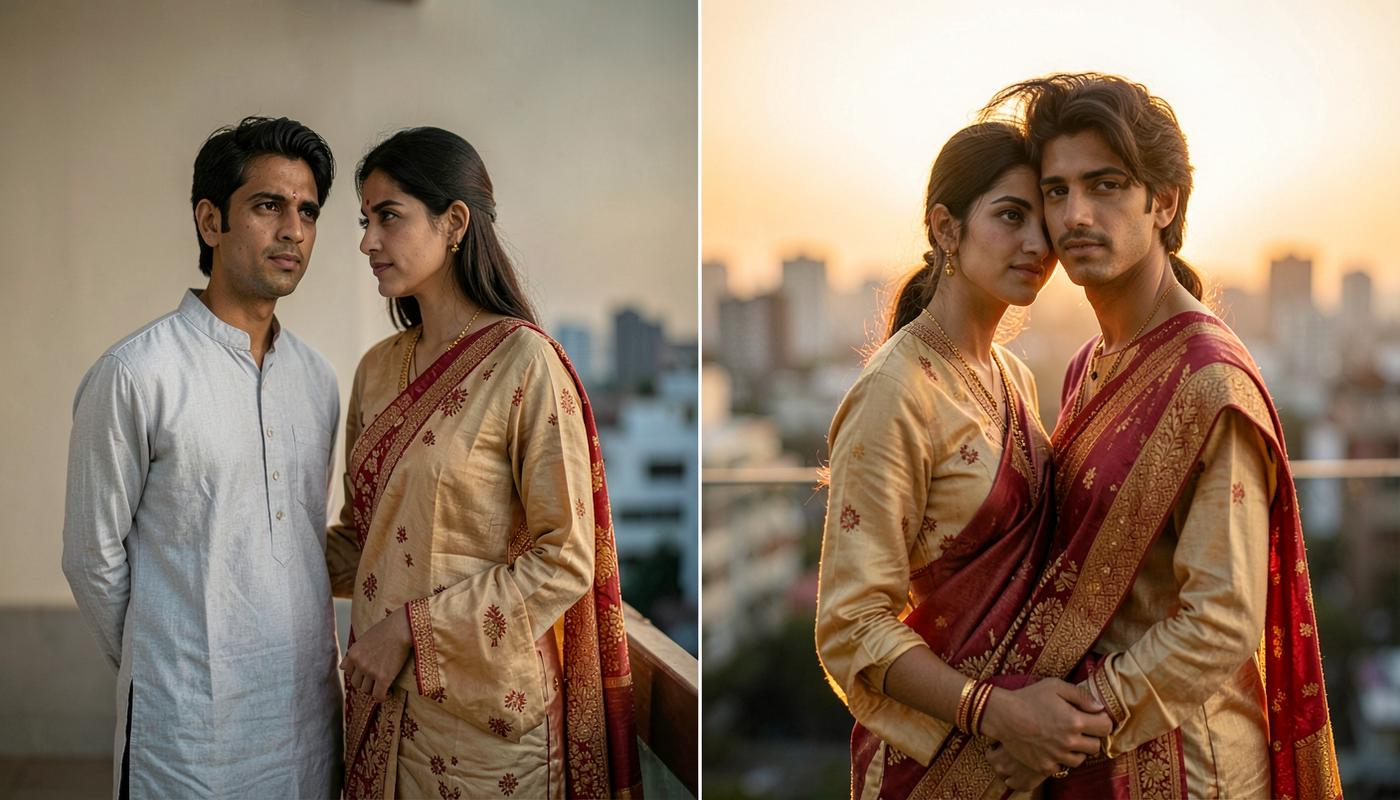
The prompt used above: "Edit the attached photo of the couple into a golden-hour rooftop portrait. Warm low sun behind them creating a soft rim light on both, softly blurred city skyline, 85mm lens with shallow depth of field. Keep both faces, outfits, skin tones and pose exactly as in the original. 4:5 portrait."
Follow-up 1: "Same image, make the background slightly less blurred."
Follow-up 2: "Keep this exact result and output it at 9:16 by extending the sky, not cropping."
Build your own couple prompt
Pick each part of the formula and copy the finished prompt straight into Gemini.
Edit the attached photo of the couple in the attached photo. Restyle it as a warm retro 1990s film photograph. Outfits: a red Banarasi saree and a cream kurta. Setting: an open rooftop at sunset with a softly blurred city skyline. Lighting: warm golden sunlight with a soft rim light on both faces. Shot on an 85mm lens with a shallow depth of field. Output as a 4:5 portrait image at the highest detail you can produce. Keep both faces, skin tones and body proportions exactly as they are unchanged, keep both people clearly recognisable, and make no other changes. Photorealistic, natural hands, no added text or watermarks.
64 Gemini AI couple photo prompts
Swap anything specific — outfit colours, city, time of day — for your own details. Everything else can be pasted as-is, with your photo attached.
Tap a category to filter. Every prompt has a copy button — paste it into ChatGPT with your photo attached, then swap the bracketed parts for your own details.
Retro & vintage
The most searched couple style right now. Warm film colour, grain and soft light do most of the work.
Edit the attached photo of the couple into a warm retro portrait. Dress the woman in a deep red Banarasi silk saree with gold border and the man in a cream kurta. Warm golden light from one side, soft film grain, slightly faded highlights. Plain warm-toned wall behind them, softly blurred. 4:5 portrait, 85mm lens look. Keep both faces, skin tones and hairstyles exactly as in the original photo, change nothing else.
Use this when: The single most popular Gemini couple trend — start here.
Restyle the attached couple photo as a 1990s film photograph: warm colour cast, visible grain, soft focus falloff at the edges and one gentle light leak in the corner. Keep both people's faces, outfits and pose exactly the same. 4:5 portrait.
Use this when: You want nostalgia without changing anything about the couple.
Convert the attached couple photo into a classic black-and-white studio portrait: single soft key light from the left, deep but detailed shadows, plain dark grey backdrop, subtle vignette. Keep both faces and expressions exactly unchanged. 4:5 portrait.
Use this when: Anniversary posts and framed prints.
Restyle the attached couple photo as an old family album photograph: warm sepia tone, gentle paper texture, softly rounded corners and slightly faded edges. Keep both faces and clothing shapes unchanged, no added text. Square output.
Use this when: Grandparents' anniversary or a throwback post.
Edit the attached couple photo into a retro street scene: the couple standing beside a vintage scooter on an old town street at golden hour, warm 70s colour grade, mild film grain. Keep both faces and body proportions exactly as in the original. 4:5 portrait.
Use this when: A story-driven retro post rather than a plain portrait.
Restyle the attached couple photo in the look of a vintage hand-painted film poster: saturated warm colours, painterly brush texture, dramatic side lighting, plain background. Keep both faces recognisable and unchanged in shape. 4:5 portrait, no text or lettering.
Use this when: A fun, obviously-stylised post where realism is not the goal.
Place the attached couple photo inside a classic instant-camera print: white border with a thicker bottom margin, slightly faded colours and a soft flash look on both faces. Keep the couple unchanged and leave the bottom margin empty. Square output.
Use this when: Story stickers and keepsake posts.
Restore the attached old couple photograph: remove scratches, creases and dust, repair the torn corner, correct the colour fading and gently sharpen both faces. Do not change either person's features, expression or clothing. Keep the original framing.
Use this when: Parents' or grandparents' damaged prints.
Romantic & cinematic
Lighting does the romance, not adjectives. Name the light source and the time of day.
Restyle the attached couple photo as a golden-hour rooftop portrait: warm low sun behind them creating a soft rim light on the hair of both people, softly blurred city skyline, gentle lens flare. 85mm lens, shallow depth of field, 4:5 portrait. Keep both faces, outfits and pose exactly as in the original.
Use this when: The most flattering all-purpose romantic edit.
Edit the attached couple photo into a cinematic rainy evening scene: the two of them under a single black umbrella, wet street reflecting warm orange streetlights, fine rain visible against the light, cool blue shadows. Keep both faces and outfits unchanged. 4:5 portrait.
Use this when: Moody, high-engagement Reels covers.
Restyle the attached couple photo as a candlelit dinner portrait: warm candle light from between them, soft falloff, dark restaurant background with round bokeh lights. Keep both faces, skin tones and clothing exactly as they are. 4:5 portrait.
Use this when: Anniversary and date-night posts.
Restyle the attached couple photo as a silhouette against a bright orange and pink sunset sky, both figures dark and clean-edged, calm sea horizon behind. Keep the exact pose and body shapes of both people. 16:9 landscape.
Use this when: You want a romantic image where likeness does not matter.
Edit the attached couple photo into a night terrace scene lit only by warm fairy lights strung above them, soft round bokeh in the background, gentle warm glow on both faces. Keep both faces and outfits exactly unchanged. 4:5 portrait.
Use this when: Cosy, warm, very shareable.
Apply a cinematic film grade to the attached couple photo: warm orange highlights on skin, teal shadows in the background, slight letterbox feel, subtle grain. Do not change the couple, their faces, outfits or the composition. 16:9 landscape.
Use this when: Your photo is fine — you just want it to look like a film still.
Relight the attached couple photo with soft diffused window light from the left, natural true-to-life skin tones, clean neutral indoor background, gentle shadow falloff. Keep both faces, hair and clothing exactly as in the original. 4:5 portrait.
Use this when: Fixing a flat, yellow, tube-lit indoor photo.
Edit the attached couple photo into a close, tender portrait with their foreheads gently touching and eyes closed, soft warm light, plain blurred background. Keep both faces exactly recognisable and unchanged in shape and skin tone. 4:5 portrait.
Use this when: You want a closer, more intimate framing from a normal standing photo.
Pre-wedding & wedding
Use these to visualise a shoot before booking it, or to restyle photos you already have.
Restyle the attached couple photo as a pre-wedding shoot in an open field at sunset: tall grass, warm backlight, the woman in a pastel pink lehenga and the man in an ivory sherwani, both walking hand in hand toward the camera. Keep both faces exactly as in the original. 4:5 portrait, 85mm shallow depth of field.
Use this when: The classic pre-wedding look.
Edit the attached couple photo into a haldi ceremony scene: both in simple yellow outfits with marigold decorations behind them, warm daylight, turmeric touches on their cheeks, joyful expressions. Keep both faces and skin tones exactly unchanged. 4:5 portrait.
Use this when: Wedding-week content.
Restyle the attached couple photo as a mehendi night portrait: green and gold outfits, henna visible on her hands, warm string lights and marigold garlands behind them, soft night lighting. Keep both faces unchanged and hands naturally shaped. 4:5 portrait.
Use this when: Function-specific posts.
Edit the attached couple photo into a traditional South Indian wedding portrait: the woman in a Kanjeevaram silk saree with temple jewellery, the man in a white veshti and angavastram, warm temple lamp lighting, stone pillars softly blurred behind. Keep both faces and skin tones exactly as in the original. 4:5 portrait.
Use this when: Regional traditional styling.
Restyle the attached couple photo as a Punjabi wedding portrait: the woman in a red and gold lehenga with a chooda and kalire, the man in a cream sherwani with a turban and sehra, bright daylight, decorated venue softly blurred behind. Keep both faces exactly unchanged. 4:5 portrait.
Use this when: North Indian wedding styling.
Edit the attached couple photo into a church wedding portrait: the woman in a white gown and veil, the man in a black suit, soft light through stained glass, aisle and pews softly blurred behind. Keep both faces, skin tones and expressions unchanged. 4:5 portrait.
Use this when: Church wedding styling.
Restyle the attached couple photo as a Bengali wedding portrait: the woman in a red and white saree with traditional forehead art, the man in a dhoti-panjabi with a topor, warm evening light, decorated mandap softly blurred behind. Keep both faces exactly as in the original. 4:5 portrait.
Use this when: Regional traditional styling.
Edit the attached couple photo into a clean save-the-date image: soft pastel background, the couple centred in the lower two-thirds, plenty of empty space at the top, gentle natural lighting. Keep both faces and outfits unchanged, and add no text. 4:5 portrait.
Use this when: You will add the names and date yourself in Canva.
Traditional Indian looks
Outfit swaps are the most reliable Gemini edit on couple photos — the faces stay put if you say so.
Edit the attached couple photo: dress the woman in a deep maroon Banarasi silk saree with a broad gold zari border and the man in a matching cream silk kurta-pyjama. Keep their faces, hairstyles, skin tones and pose exactly as in the original. Warm soft indoor lighting, plain blurred background, 4:5 portrait.
Use this when: Festive posts from a casual photo.
Restyle the attached couple photo in a royal Rajasthani setting: the woman in a bandhani lehenga with heavy silver jewellery, the man in an ivory achkan with a colourful safa, carved haveli archway softly blurred behind, warm afternoon light. Keep both faces exactly unchanged. 4:5 portrait.
Use this when: A dramatic, high-detail traditional edit.
Edit the attached couple photo: dress the woman in a simple beige cotton handloom saree and the man in a matching kurta, minimal jewellery, soft natural daylight, plain textured wall behind. Keep both faces, hair and pose unchanged. 4:5 portrait.
Use this when: An understated, natural traditional look.
Restyle the attached couple photo as a Diwali portrait: rich festive Indian outfits, rows of warm diyas softly out of focus behind them, golden ambient glow on both faces. Keep both faces and skin tones exactly as in the original. 4:5 portrait.
Use this when: Diwali greetings and brand posts.
Edit the attached couple photo into a Holi scene: light dry colour powder on their clothes and cheeks, soft pink and yellow powder in the air, bright daylight, joyful expressions. Keep both faces recognisable and unchanged in structure. 4:5 portrait.
Use this when: Holi content.
Restyle the attached couple photo as a temple visit portrait: traditional simple outfits, stone temple corridor softly blurred behind, warm morning light, calm expressions. Keep both faces and skin tones unchanged. 4:5 portrait.
Use this when: Devotional or festival posts.
Edit the attached couple photo into a Karwa Chauth evening portrait: the woman in a red saree with traditional jewellery holding a decorated thali, the man beside her, moonlit night sky, warm diya light on their faces. Keep both faces exactly unchanged and hands naturally shaped. 4:5 portrait.
Use this when: Festival-specific posts.
Edit the attached couple photo so both wear coordinated pastel mint ethnic outfits — a mint anarkali for her and a mint kurta with white pyjama for him. Keep both faces, hairstyles and body proportions exactly as in the original. Soft daylight, plain neutral background, 4:5 portrait.
Use this when: Coordinated-outfit family function photos.
Travel & outdoor
Background replacement is Gemini's strongest skill. These prompts lean on it.
Replace the background of the attached couple photo with an open beach at sunset: wet sand reflecting the sky, gentle waves, warm low sun behind them. Match the lighting direction and colour temperature on both people so the composite looks real. Keep both faces and outfits unchanged. 4:5 portrait.
Use this when: Turning an indoor photo into a holiday photo.
Edit the attached couple photo into a mountain viewpoint scene: layered blue-grey peaks and light mist behind them, cool crisp daylight, both in casual jackets. Keep both faces and body proportions exactly as in the original. 16:9 landscape.
Use this when: Trek and travel content.
Restyle the attached couple photo as a candid café moment on a European street: small round table, warm afternoon light, old buildings softly blurred behind, both mid-conversation. Keep both faces and clothing unchanged. 4:5 portrait.
Use this when: Travel-diary aesthetic.
Edit the attached couple photo into a Kerala backwater scene: the two of them seated in a small wooden boat, coconut palms reflected in still green water, soft overcast light. Keep both faces exactly unchanged. 16:9 landscape.
Use this when: Indian travel content.
Restyle the attached couple photo as a snowy evening street scene: light snowfall, warm shop lights behind, both in winter coats and scarves, cool blue ambient light with warm highlights. Keep both faces unchanged. 4:5 portrait.
Use this when: Winter and Christmas posts.
Edit the attached couple photo into a road trip scene: the two of them sitting on the open boot of a car on an empty highway at dusk, purple-orange sky, headlights glowing behind. Keep both faces and outfits exactly as in the original. 16:9 landscape.
Use this when: Story-style travel content.
Restyle the attached couple photo as a desert dunes portrait at golden hour: rippled sand, long soft shadows, warm side light, flowing light-coloured clothing. Keep both faces and skin tones unchanged. 4:5 portrait.
Use this when: A dramatic, minimal background.
Edit the attached couple photo into a night city portrait: blurred neon signs and traffic light trails behind them, cool ambient light with a warm key light on their faces. Keep both faces, outfits and pose exactly unchanged. 4:5 portrait.
Use this when: Modern, urban, high-contrast look.
Trending Instagram styles
Fun, obviously-stylised looks. Likeness matters less here, so you can push further.
Turn the couple in the attached photo into two stylised 3D collectible figurines standing together on a round base inside a clear display box, soft studio lighting, plain background. Keep their hairstyles, outfit colours and recognisable features. Square output, no text on the box.
Use this when: The viral figurine trend.
Restyle the attached couple photo as a tiny handcrafted diorama on a wooden desk: the couple as miniature figures in a small detailed scene, shallow macro depth of field, warm lamp light. Keep their outfits and pose recognisable. Square output.
Use this when: Playful, highly saveable posts.
Restyle the attached couple photo as a soft anime illustration: clean linework, warm pastel palette, gentle cel shading, simple sunset background. Keep both hairstyles, outfit colours and the pose recognisable. 4:5 portrait.
Use this when: Younger audiences and profile art.
Restyle the attached couple photo as a loose watercolour painting on textured paper: soft bleeding edges, muted palette, white space around the figures. Keep both people's pose and outfit colours recognisable. 4:5 portrait.
Use this when: Anniversary gifts and print-ready art.
Turn the couple in the attached photo into a die-cut sticker: bold white outline around both people, simplified flat colours, plain background. Keep their pose and expressions recognisable. Square output.
Use this when: WhatsApp sticker packs.
Restyle the attached couple photo as a single comic book panel: bold ink outlines, halftone dot shading, limited colour palette, dramatic lighting. Keep both people recognisable. Leave the top strip empty with no text. 4:5 portrait.
Use this when: Storytelling carousels.
Restyle the attached couple photo as stop-motion clay figures: visible clay texture and fingerprints, chunky simplified shapes, soft studio lighting, plain pastel backdrop. Keep hair colour, outfit colours and pose recognisable. Square output.
Use this when: Fun, distinctive, low-risk on likeness.
Create a double-exposure effect from the attached couple photo: their silhouette blended with a soft mountain-and-sky landscape, muted colour palette, clean white background around the silhouette. Keep the outline of both figures unchanged. 4:5 portrait.
Use this when: Artistic posts and wallpapers.
Restyle the attached couple photo as a Diwali evening portrait: both people sitting close on a decorated balcony, holding lit clay diyas together, marigold garlands and string lights softly out of focus behind, warm golden firelight on both faces. Keep both people's faces, skin tones, heights and outfits exactly as they are. Photorealistic, 4:5 portrait, no added text.
Use this when: Diwali wishes and festive couple posts.
Turn the attached couple photo into a Navratri garba night scene: the woman in a colourful chaniya choli and the man in a kediyu, playing dandiya facing each other, string lights and a festive crowd blurred behind. Keep both faces, skin tones and body proportions exactly unchanged. 4:5 portrait.
Use this when: Navratri Reels covers and festival memories.
Restyle the attached couple photo as a Karwa Chauth moonrise portrait on a rooftop: the woman in a red saree holding a decorated sieve and thali, the man beside her, full moon low in a deep blue sky, soft diya light on both faces. Keep both people's faces, expressions and skin tones exactly as in the original. Cinematic, 4:5 portrait.
Use this when: Karwa Chauth posts and anniversary greetings.
Two photos into one couple photo
Long-distance, missed occasions, or a photo where one person was not present. Expect more iteration here.
I have attached two photos, one of each person. Place both people together in a single frame, standing side by side, facing the camera, in soft natural daylight against a plain neutral background. Keep each person's face, hairstyle and outfit exactly as in their own photo. Match the lighting and scale of both people so the result looks like one real photograph. 4:5 portrait.
Use this when: The core merge prompt — run this first, then restyle.
Using the two attached photos, create one image of these two people standing close together at golden hour on a rooftop, warm rim light on both, blurred skyline behind. Keep each face identical to its source photo — do not blend or average the faces. 4:5 portrait.
Use this when: A merge and a style in one step, once the plain merge works.
Same image, but the person on the right is too large relative to the person on the left. Rescale them so both heights are realistic for people standing side by side, keeping both faces exactly as they are and the background unchanged.
Use this when: The classic merge failure.
Same image. The lighting on the two people does not match — one is lit from the left and the other from the right. Relight both consistently with a single soft key light from the left, keeping both faces and outfits unchanged.
Use this when: The composite looks pasted together.
I have attached a group photo and a separate photo of one more person. Add that person into the group photo standing at the right end of the row, matching the scale, lighting and perspective of the existing photo. Keep every existing person and the added person's face exactly as in their source photos.
Use this when: Someone missed the family photo.
Using the two attached photos of the same couple taken years apart, create a single side-by-side image with the older photo on the left and the recent one on the right, matching colour grade and framing so they read as a pair. Keep both photos' faces exactly unchanged and add no text.
Use this when: Anniversary then-and-now posts.
Using the two attached photos, create one image of these two people together and dress both in coordinated navy formal outfits. Keep each person's face, hairstyle and skin tone exactly as in their own photo. Plain grey studio background, soft even lighting, 4:5 portrait.
Use this when: Invitations and formal announcements.
Same image. Show me the result at maximum detail, and confirm that neither face has been altered from the source photos. If either face has changed, restore it exactly and regenerate.
Use this when: A final check before you post a merged photo.
Fix-it & refinement prompts
Never start over. These follow-ups correct a nearly-right result in the same chat.
Same image, but both faces have changed. Restore both original faces exactly as they are in the photo I uploaded, and keep only the new outfits and background.
Use this when: Likeness drift — the most common complaint.
Same image, keep everything else pixel-for-pixel, and only redraw the hands — correct finger count and natural hand shapes where they are holding hands.
Use this when: Interlocked hands came out wrong.
Same image but far more natural: reduce the saturation and the smoothing, restore visible skin texture on both faces, and keep the colour grade subtle.
Use this when: The output looks plastic or over-filtered.
Keep this exact result and output it at 9:16 by extending the background upward and downward, not by cropping. Both people must stay fully in frame.
Use this when: Repurposing a feed image for Reels or status.
Same image. The shadows do not match the light source. Correct both people's shadows to fall consistently with the key light, keeping their faces and outfits unchanged.
Use this when: The composite feels fake but you cannot say why.
Same image, keep everything else identical, and only restore the jewellery to match the original photo exactly — same necklace, earrings and bangles.
Use this when: Gemini reinvented the jewellery.
Keep this exact result but reframe it as a tighter waist-up portrait of the couple, keeping both faces sharp and unchanged and the background style the same.
Use this when: Too much empty space around the couple.
Keep this exact result and give me four variations that change only the background — rooftop sunset, indoor window light, marigold courtyard and plain studio — with both faces, outfits and pose identical in all four.
Use this when: You want a carousel from one photo.

100+ AI Photo Editing Prompts Pack (Instant Download)
Copy-paste prompts for ChatGPT & Gemini photo edits
- 100+ copy-paste prompts across 8 categories: portraits, Instagram trends, backgrounds, product shots, restoration, creative styles, text-on-image and ad creatives
- The 6-part prompt formula with worked examples
- Follow-up prompts to fix likeness, lighting and background issues
- Aspect-ratio cheat sheet for every social and ad placement
Look inside
Secure Razorpay checkout One-time payment, lifetime accessInstant download
Seven mistakes that ruin Gemini couple photos
- No photo attached. Gemini then generates a fictional couple. Upload first, prompt second.
- No preservation clause. If you did not protect it, the model can change it.
- Three styles in one prompt. One style per prompt, then iterate.
- No aspect ratio. You get a square, then you crop one person out of frame.
- Uploading a compressed forward. Garbage in, plausible-looking garbage out.
- Adjective soup. "Stunning, ultra HD, 8K, masterpiece" adds nothing. Concrete nouns, outfits and lighting terms do.
- Not saving the prompt that worked. The prompt is the reusable asset, not the image.
Gemini vs other tools for couple photos
| Tool | Best at | Weakness | Good for |
|---|---|---|---|
| Google Gemini | Conversational edits, outfit swaps, background replacement, holding two people consistent across follow-ups | Hands, fine jewellery, exact likeness at small sizes | Retro and traditional couple restyles |
| ChatGPT | Understanding a long written brief, quick variations | Likeness drift, small text | Structured, repeatable edits |
| Canva Magic Studio | Templates, text, layout, batch resizing | Weaker photorealistic restyles | Adding names and captions after the edit |
| Photoshop | Pixel-level control, exact colour, non-destructive edits | Slow, needs skill | Final retouching before print |
How marketers use couple prompts
This is not only a personal-photo trend. Wedding photographers, jewellery brands, salons, travel agencies and event planners use the same prompts to mock up campaign creative before a shoot exists:
- Concept boards for a pre-wedding shoot, so the client approves the look before the booking
- Ad creative variations — the same couple in four settings, so you test one variable at a time, as covered in our ChatGPT ads guide
- Seasonal campaign visuals for Diwali, Karwa Chauth and wedding season without a new shoot
- Landing page hero images for wedding services — the same discipline as any other landing page build
If you want the paid-ads side of this — turning creatives into performance — that is the whole point of our performance marketing course.
Before you post: the checklist
Ticks are saved in this browser — come back and pick up where you left off.
Test yourself
No signup, instant score. Answer all 5 and check where you stand.
Safety, consent and honesty
Three rules worth keeping:
- Consent first. Never edit or post an AI-altered photo of someone without asking them — including your partner.
- No one else's face. Do not generate romantic images of celebrities, colleagues or strangers. That is a deepfake, not a trend.
- Do not pass it off as real. Gemini's output carries SynthID. If the image implies something that did not happen — a place you never visited, an event that never occurred — label it as AI-edited.
Want the other 40+ prompts? The full pack adds the fix-it prompts, worked examples and aspect-ratio cheat sheets.
Where to go next
Start with three prompts: the retro saree portrait, the golden-hour rooftop and one fix-it prompt. Run them on the same photo, save whichever wording keeps both faces intact, and reuse it. The prompt you save is worth more than any single image it produces.
For the ChatGPT equivalents of everything here, read ChatGPT photo editing prompts — 75 ChatGPT prompts you can copy and paste, including the photo editing prompts trending on Instagram.
For solo portraits, festive looks and product photos in Gemini, see the full Gemini AI photo editing prompts library — and the Nano Banana prompts guide if you know the model by its nickname.
For a decade-specific couple restyle, our 1980s couple photo styling guide explains how to combine two-person identity protection with prom, diner, Bollywood and family-album looks without mixing eras.
Want to turn this into an income skill? The same prompt discipline runs the whole marketing stack. Learn digital marketing with AI in a live 8-week online batch — ads, SEO, content, automation and analytics — starting with a free session.
Glossary
- Image-to-image editing
- Editing an uploaded photo rather than generating a new one from scratch. Everything in this guide assumes your photo is attached.
- Likeness drift
- When an AI edit subtly changes a person's face so they no longer look like themselves. Prevented with an explicit preservation clause.
- Preservation clause
- The final line of a prompt that lists what must not change — faces, skin tone, outfit, jewellery.
- Aspect ratio
- The shape of the output image. 1:1 square, 4:5 Instagram feed portrait, 9:16 Reels and status, 16:9 landscape.
- SynthID
- Google's invisible watermark embedded in images generated or edited by its AI models, used to identify AI-created content.
- Iterative prompting
- Refining a result with follow-up instructions in the same chat instead of rewriting the whole prompt.
Sources & Further Reading
Frequently Asked Questions
What is the best couple prompt for Gemini AI?+
The best prompt names seven things: both subjects, the scene, the outfits, the lighting, the camera look, the aspect ratio and what must stay unchanged. For example: 'Edit the attached photo of the couple into a warm retro portrait — red Banarasi saree and cream kurta, golden side light with soft film grain, plain warm wall behind, 85mm lens, 4:5 portrait, keep both faces and skin tones exactly as in the original.' That structure removes every guess the model would otherwise make for you.
How do I make a couple photo in Gemini AI?+
Open Gemini, start a new chat, upload the original photo, then paste a prompt describing both people, one style, the outfits, the lighting and the aspect ratio, ending with a keep-both-faces-unchanged clause. Refine the result with follow-up messages in the same chat instead of starting again.
Why does Gemini change our faces in the edited photo?+
Because image editing regenerates pixels rather than masking them. Add an explicit clause — 'keep both faces, skin tones and hairstyles exactly as in the original, change nothing else' — request only one style per prompt, and upload a sharp full-resolution photo. If a face still drifts, reply in the same chat asking it to restore the original faces and keep only the new background.
Can Gemini combine two separate photos into one couple photo?+
Yes. Upload both photos and ask it to place both people in one frame, stating that each face must stay identical to its own source photo and that the scale and lighting must match. Merges need more iterations than a single-photo edit, so expect to fix scale, lighting or hands with follow-up prompts.
Are Gemini AI couple photo prompts free?+
The prompts cost nothing and can be pasted as-is. Gemini's free tier includes a limited amount of image work that changes over time, with higher limits on paid plans. The same prompt structure also works in other image tools, so nothing here is locked to one product.
What is the best aspect ratio for couple photos on Instagram?+
4:5 portrait for the feed — it takes the most vertical space without being cropped. Use 9:16 for Reels and status, and 1:1 square for grid consistency. Ask for the ratio inside the prompt; cropping afterwards usually cuts one of the two people out of frame.
Is it safe to upload our photos to Gemini?+
Read Google's Gemini Apps privacy terms before uploading anything sensitive, and note that human reviewers may see conversations in some settings. Only upload photos of people who have agreed to it, and never create AI images of someone else's face without their consent.
Do Gemini images have a watermark?+
Images created or edited by Google's image models carry SynthID, an invisible digital watermark that identifies them as AI-generated. It does not change how the image looks, but detection tools can read it — so do not present an AI-edited photo as an unedited photograph.
How do I get the same style across several photos?+
Save the winning prompt and reuse it word for word, changing only the uploaded photo. Consistency comes from the constant parts — the lighting phrase, the background, the ratio and the preservation clause — so keep those identical.
Gemini or ChatGPT for couple photos?+
Gemini is generally faster at conversational edits and holding two people consistent across follow-up prompts, and it handles background swaps well. ChatGPT is strong at understanding a longer written brief. Both struggle with hands, jewellery detail and exact likeness, so the checking step matters either way. If you want the ChatGPT versions of these prompts, see our [ChatGPT photo editing prompts guide](/blog/chatgpt-photo-editing-prompts).
Join our live training program and become a performance marketing professional.
Instant-download resources from the PMAcademy shop that pair with this guide.
- AI Prompts100+ AI Photo Editing Prompts Pack (Instant Download)Copy-paste prompts for ChatGPT & Gemini photo edits₹99
- AI Prompts10,000+ AI Prompts Library for Marketers (Instant Download)Ready-to-use prompts for ads, content, SEO and research₹499
- Trackers & SheetsCreative Testing Matrix Template (Instant Download)Test hooks and angles without burning budget₹199