3D Portfolio Website: How to Create a Portfolio Website With AI (2026)
What a 3D portfolio website is, how it differs from a normal portfolio website, what to include, the tools to use, and how to create a portfolio website step by step with AI — no coding — including 3D elements, mobile speed, SEO and publishing on your own domain.
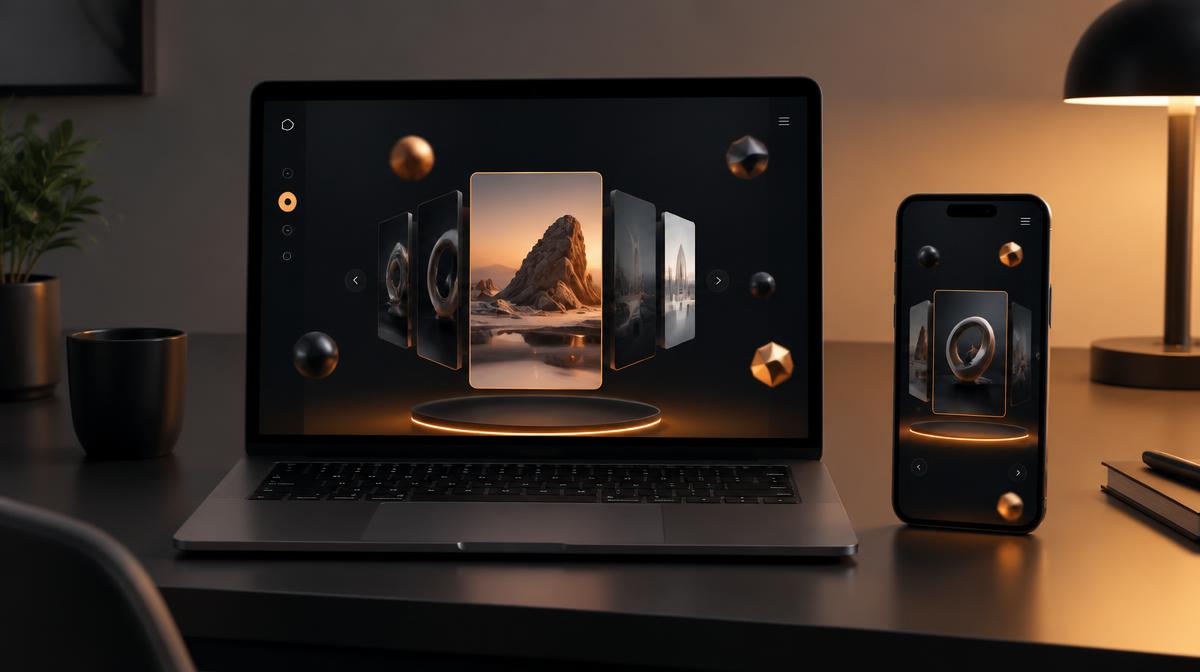
- 01What is a portfolio website (and what makes it 3D)
- 02Who should build a 3D portfolio website
- 03What to include on your portfolio website
- 04Tools for building a 3D portfolio website
- 05How to create a portfolio website step by step (with AI)
- 063D styles you can use
- 07Common mistakes to avoid
- 08How to get your portfolio website found on Google
- 09Turn the skill into income
- 10Next steps
We'll email you our Performance Marketing Setup Checklist instantly.
No spam. Unsubscribe anytime.
A portfolio website is the single page that answers the question every employer and client has: "Can this person actually do the work?" A 3D portfolio website answers the same question, but in a way people remember — with depth, movement and interaction that a flat page of thumbnails can't match.
The good news is that you no longer need to be a developer to build one. In this guide you'll learn what a 3D portfolio website is, when it makes sense (and when it doesn't), exactly what to put on it, and how to create a portfolio website step by step with AI — including the 3D part, mobile speed, SEO and publishing on your own domain.
If you'd prefer to build alongside a trainer, our AI E-Commerce Website Course teaches you to build complete websites and web apps with Lovable, ChatGPT and Claude live — the same skills you'll use to build the portfolio in this guide.
What is a portfolio website (and what makes it 3D)
A portfolio website is a personal website that collects your best work in one place. For a designer that's visuals; for a developer it's projects and code; for a marketer it's campaigns and case studies; for a photographer it's galleries. A good portfolio website usually has five parts:
- An introduction — who you are and what you do, in one sentence.
- Projects — your best 3–6 pieces of work, each explained.
- About — your background, skills and the tools you use.
- Proof — testimonials, certificates, or results you can stand behind.
- Contact — a form, email, WhatsApp button or booking link.
A 3D portfolio website keeps all five parts but changes how they're presented. Instead of a flat layout, it adds three-dimensional elements such as:
- a rotating 3D object or character in the hero section,
- project cards that tilt and catch light as you move the mouse,
- a scene where scrolling moves a camera through space,
- layered parallax backgrounds that create depth,
- a 3D model of a product you designed that visitors can spin.
3D portfolio vs normal portfolio website
| Normal portfolio website | 3D portfolio website | |
|---|---|---|
| First impression | Clean, simple | Memorable, interactive |
| Loading speed | Usually fast | Slower unless optimised |
| Effort to build | Low | Medium (low with AI help) |
| Works on old phones | Yes | Needs a fallback |
| Best for | Any role | Designers, developers, creatives, freelancers |
| SEO | Easy | Same, as long as text and speed are kept |
The key point: 3D is the wrapping, not the gift. Recruiters and clients still decide based on your projects. 3D helps you get noticed and remembered; it doesn't replace substance.
Who should build a 3D portfolio website
A 3D portfolio website is worth it if your work is visual or technical and you want to stand out in a crowded field:
- UI/UX and graphic designers — 3D shows you understand modern visual trends.
- 3D artists and animators — the website itself becomes a sample of your skill.
- Web developers — an interactive site proves you can build beyond templates.
- Freelancers and agencies — a striking site helps win clients who are judging your taste.
- Students and freshers — a polished portfolio can make up for limited work history.
For digital and performance marketers, a simple, fast portfolio website with strong case studies usually works better than heavy 3D. A subtle 3D touch in the hero section is enough; the case studies do the selling. Our guide to building a digital marketing portfolio covers which projects to include.
What to include on your portfolio website
Before you open any tool, prepare your content. This is the step most people skip — and it's why so many portfolio websites look good but say nothing.
1. A one-line headline
Write one sentence that says what you do and for whom. Examples:
- "I design mobile apps for early-stage startups."
- "Web developer building fast websites for small businesses in Hyderabad."
- "Digital marketer running Google and Meta ads for local brands."
2. Three to six projects
For each project, write four short parts:
- The problem — what the client or you needed.
- What you did — your steps, tools and decisions.
- The outcome — what changed. Use only numbers you can verify; if you don't have numbers, describe the result honestly.
- Visuals — screenshots, mock-ups, or a short screen recording.
Self-initiated projects are fine; label them as personal projects.
3. About and skills
Two or three short paragraphs about your background, followed by a list of tools you use. Add a real photo — it builds trust.
4. Proof
Testimonials from clients, teachers or managers, certificates, or links to live work. Never invent testimonials.
5. Contact
A simple form, your email, and — for Indian audiences especially — a WhatsApp button, which often gets far more responses than email.
6. Your 3D idea
Decide on one 3D concept that relates to your work. A designer might use floating shapes in brand colours; a developer might use a rotating laptop; a photographer might use a 3D camera. One strong idea beats five random effects.
Tools for building a 3D portfolio website
| Tool | What it does | Coding needed | Cost |
|---|---|---|---|
| Lovable | AI builder: creates the full website from your description | No | Free plan, paid plans available |
| ChatGPT / Claude | Writes copy, prompts and project descriptions | No | Free and paid |
| Spline | Design 3D scenes in the browser and embed them | No | Free plan, paid plans available |
| Three.js | JavaScript library for 3D in the browser | Yes (AI can write it) | Free |
| React Three Fiber | Three.js for React sites | Yes (AI can write it) | Free |
| Blender | Create your own 3D models | No code, but a learning curve | Free |
| Free model libraries | Ready-made 3D models to use | No | Free and paid (check licences) |
For most people the simplest path is: Lovable for the website, Spline or AI-generated Three.js for the 3D, and ChatGPT or Claude for the writing.
How to create a portfolio website step by step (with AI)
Here's the full process, from blank page to live 3D portfolio website.
Step 1: Plan the pages and sections
Most portfolios work best as a single long page with these sections: hero, projects, about, testimonials, contact. Add separate project pages only if each project needs a long write-up.
Write a short brief in a document:
- your name and headline,
- the sections you want,
- the style (for example "dark, minimal, with one warm accent colour"),
- the 3D idea,
- two or three websites you like, described in words.
Step 2: Write your first prompt
Open an AI website builder such as Lovable and describe the site. A good first prompt is specific about content and style:
Build a one-page portfolio website for Priya, a UI/UX designer in Bengaluru who designs mobile apps for startups. Sections: hero with her name and headline, 4 project cards, about with photo, testimonials, contact form and a WhatsApp button. Style: dark background, soft gradients, one coral accent colour, modern sans-serif font. In the hero, add a lightweight 3D scene of floating rounded shapes that slowly rotate and react to the mouse.
The AI builds a first version in a few minutes. Don't expect perfection — expect a solid starting point.
Step 3: Add the 3D element
There are two common ways:
Option A — Spline (no code). Design a small scene in Spline, export it as a web embed, and ask the AI builder: "Embed this Spline scene in the hero section, behind the text, and show a static image on phones."
Option B — Three.js / React Three Fiber (AI-written code). Ask the builder directly: "Add a React Three Fiber scene in the hero with a single glossy 3D object that rotates slowly and tilts toward the mouse. Keep it lightweight and load it after the page text."
Either way, keep the scene small: one or two objects, simple lighting, no huge textures.
Step 4: Add your real projects
Replace the placeholder projects with your own. Upload images, paste in your problem–work–outcome write-ups, and ask the AI to tidy the layout: "Make each project card open a detailed section with screenshots and the full write-up."
Step 5: Make it fast on mobile
This step decides whether your 3D portfolio website helps or hurts you. Ask the AI to:
- load the 3D scene only after the main text has appeared,
- replace the 3D scene with a still image on small or slow devices,
- compress all images and use modern image formats,
- respect the "reduce motion" setting for visitors who prefer less animation.
Then open the site on a mid-range Android phone on mobile data. If it feels slow, reduce the 3D.
Step 6: Add contact and tracking
Make sure the contact form actually sends messages to you, and the WhatsApp button opens a chat with a pre-filled message. If you want to know how many people visit, add Google Analytics.
Step 7: Publish on your own domain
Publish the site, then connect a custom domain such as yourname.in or yourname.com. A custom domain looks far more professional on a résumé, LinkedIn profile or proposal than a default builder address.
Step 8: Share it
Put the link on your résumé, LinkedIn Featured section, Instagram bio, email signature and every proposal you send. Our digital marketing resume guide shows where the portfolio link should go.
3D styles you can use
- Floating shapes — soft, abstract objects in your brand colours. Safe, modern, works for almost anyone.
- Personal object — a 3D item linked to your work: a camera, a laptop, a sketchbook, a product you designed.
- Tilt cards — flat project cards that tilt in 3D as the mouse moves. Very light and very effective.
- Scroll journey — the camera moves through a scene as you scroll, revealing sections. Impressive but heavier; best for 3D artists and developers.
- 3D avatar — a stylised version of you that waves or follows the cursor. Memorable and personal.
- Product viewer — visitors can spin and zoom a model. Ideal for industrial and product designers.
Common mistakes to avoid
- Too much 3D. Effects on every section make the site slow and confusing. Use one strong 3D moment.
- Slow loading. If the page takes too long, many visitors leave before they see anything.
- No real text. A site that's only visuals can't be found on Google and doesn't explain your work.
- Weak projects. A beautiful site with thin projects still won't get you hired.
- Hidden contact details. Put a contact button in the header and at the end of the page.
- No phone testing. Most visitors in India will open your link on a phone.
- Invented proof. Fake testimonials or numbers destroy trust the moment someone checks.
How to get your portfolio website found on Google
A portfolio website mainly gets traffic from people you send it to, but basic SEO helps people who search your name or service find you:
- Use a clear page title, such as "Priya Sharma — UI/UX Designer in Bengaluru".
- Write a short description that says what you do and where.
- Put your name, role and services in real text, not only inside images or 3D scenes.
- Give each project a heading and a few paragraphs of explanation.
- Add descriptive alt text to images.
- Keep the page fast — speed is part of Google's page experience signals.
- Link to your portfolio from LinkedIn, GitHub, Behance or Dribbble.
Turn the skill into income
Once you can create a portfolio website with AI — including 3D elements — you can build the same kind of site for others: freelancers, local businesses, coaches and small brands all need websites. That's a practical skill you can learn, practise on your own portfolio, and then offer as a service.
Our AI E-Commerce Website Course teaches you to build complete websites, online stores and web apps with Lovable, ChatGPT and Claude, live, with no coding — and covers payments, publishing and bringing in customers with Meta ads. If you want to explore digital marketing more broadly first, join our free masterclass.
Next steps
- Write your headline and pick 3–6 projects this week.
- Draft your first prompt using the template above.
- Build the first version with an AI builder, then add one 3D element.
- Test on a phone, fix speed, and publish on your own domain.
- Share the link everywhere you apply or pitch.
Want help building it? See the AI E-Commerce Website Course. Working on your career materials too? Read how to become a digital marketer and 12 portfolio projects to build.
Glossary
- Portfolio website
- A personal website that shows your best work, skills and contact details to employers or clients.
- 3D portfolio website
- A portfolio website that uses three-dimensional graphics or depth effects, such as a rotating model or interactive scene.
- Three.js
- A popular JavaScript library for showing 3D graphics in a web browser.
- React Three Fiber
- A way to use Three.js inside React websites; many AI builders generate React code.
- Spline
- A browser-based design tool for creating 3D scenes without code and embedding them in websites.
- Hero section
- The first block of a web page a visitor sees, usually with your name, a headline and the main visual.
- Parallax
- A scrolling effect where background and foreground layers move at different speeds, creating a sense of depth.
- Core Web Vitals
- Google's page-experience measurements for loading speed, responsiveness and visual stability.
- Custom domain
- Your own web address, such as yourname.in, instead of a builder's default address.
Sources & Further Reading
Frequently Asked Questions
What is a 3D portfolio website?+
It is a portfolio website that uses three-dimensional elements — for example a rotating 3D object in the hero section, cards that tilt with your mouse, or a small interactive scene — to present your work. The content is the same as any portfolio website (projects, about, contact); the 3D is the presentation layer.
How do I create a portfolio website without coding?+
Use an AI website builder such as Lovable. Describe who you are, what you do, the sections you want and the style you like in plain English; the AI builds the site. You then refine it with follow-up prompts, add your real projects and images, and publish it, optionally on your own domain.
Does a 3D portfolio website slow down the page?+
It can. 3D models and scenes are heavy files. Keep 3D to one section, compress models, show a simple image on slow phones, and load the 3D only after the main text appears. Always test on a mid-range Android phone.
Is a 3D portfolio website good for SEO?+
The 3D itself doesn't help SEO, and heavy 3D can hurt it by slowing the page. What helps is real text: your name, role, services, project descriptions, a clear page title and description, and fast loading. Build the 3D around that content, not instead of it.
Who should build a 3D portfolio website?+
It suits designers, 3D artists, web developers, creative marketers and freelancers who want to stand out. For roles where results matter most — such as performance marketing — a clean, fast portfolio website with strong case studies is often more effective than heavy 3D.
What should a portfolio website include?+
A short headline about what you do, 3–6 of your best projects with the problem, your work and the outcome, an about section, skills or tools, proof such as testimonials or numbers you can verify, and a contact form or WhatsApp button.
Which tools are used to make 3D websites?+
Spline for no-code 3D scenes, Three.js and React Three Fiber for code-based 3D (an AI builder can write this code for you), Blender for creating your own 3D models, and free model libraries for ready-made objects.
How long does it take to create a portfolio website with AI?+
A first version can be built in under an hour with an AI builder. Writing good project descriptions and collecting images usually takes longer than building the site itself, so prepare your content first.
Join our live training program and become a performance marketing professional.