Google Ads Landing Page: 6 Types Matched to Search Intent (2026 Guide)
Why sending every Google Ads search to one page wastes money, the 6 landing page types (intent, location, explainer, comparison, pricing, offer) to match each search, and a step-by-step audit — including a Claude skill — to find spend landing on the wrong page.

- 01Why one landing page for every search leaks money
- 02The 6 landing page types for Google Ads searches
- 03Quick reference table
- 04How to audit your account: find spend landing on the wrong page
- 05Using Claude (or another AI assistant) to run the review in minutes
- 06What to fix first
- 07Landing page basics that help every type
- 08A 30-day plan
- 09Learn Google Ads and landing pages with PMAcademy
- 10The bottom line
We'll email you our Performance Marketing Setup Checklist instantly.
No spam. Unsubscribe anytime.
Most Google Ads accounts send every click to the same place — the homepage, or one service page. That is fine for someone who is ready to book. It is a poor fit for someone who is comparing options, checking a price, or still working out what their problem is.
The result is quiet waste: you pay for the click, the visitor does not find what they searched for, and they leave. This guide shows you how to fix that with six landing page types, each matched to a kind of search, plus a simple audit (which an AI assistant like Claude can run in minutes) to find the spend that is landing on the wrong page.
The six-page idea was popularised by Luke Kuhlman (Clickco), who shared a free Claude skill that sorts search terms into these page types. This article explains the method in detail so you can apply it to your own account — with or without that tool.
Why one landing page for every search leaks money
Think about the different people who might search for a dental clinic in Hyderabad:
- "dentist for kids in Kondapur" — wants a child-friendly clinic.
- "dentist near me" — wants something close and open now.
- "signs of tooth infection" — not sure they need a dentist yet.
- "Clove Dental alternative" — comparing you with a brand.
- "root canal cost in Hyderabad" — wants a price before anything else.
- "book dental appointment today" — ready right now.
If all six land on the homepage, only the last person finds exactly what they wanted. The others have to hunt for the answer — and most won't.
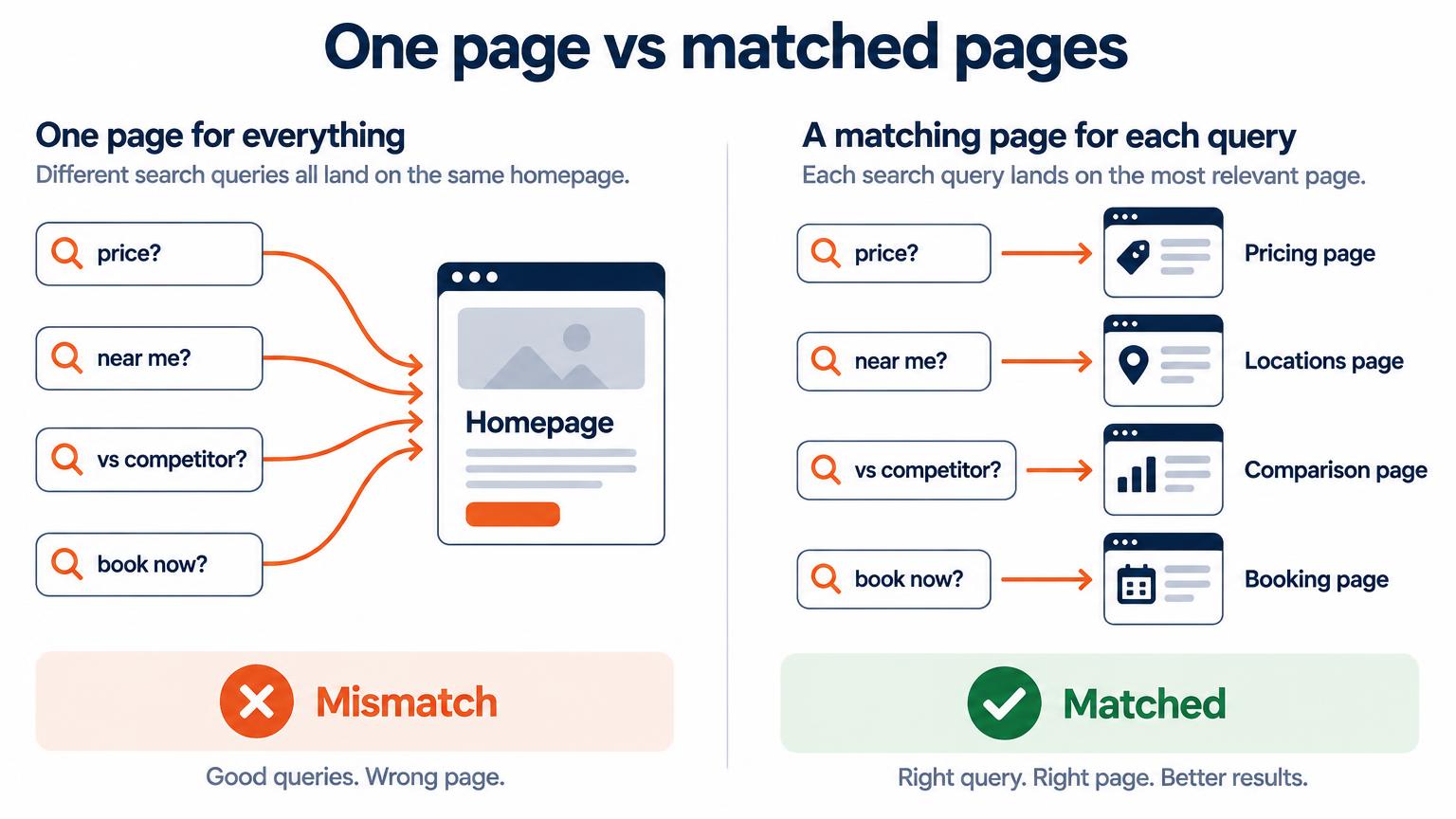
Google also notices. Landing page experience is one of three Quality Score components. A page that answers the search directly tends to keep people engaged, which supports better ad rank and lower costs over time.
The 6 landing page types for Google Ads searches
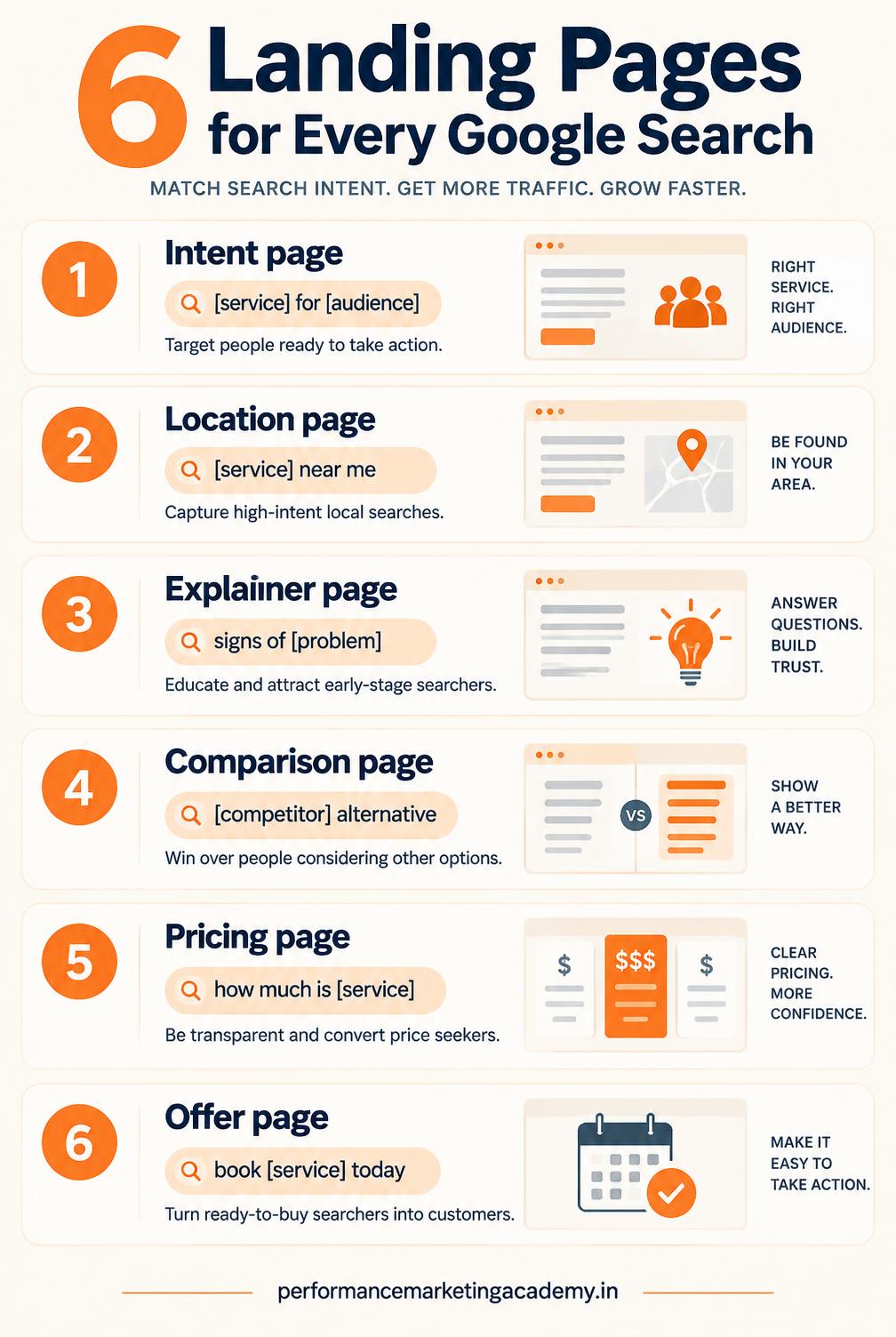
1. Intent pages — "[service] for [audience]"
Who searches: people with a specific need, audience or benefit in mind — "digital marketing course for housewives", "physiotherapy for seniors", "same-day AC repair".
What goes on the page: one page per need. The headline repeats the need ("Digital Marketing Course Built for Housewives"), the body addresses that audience's worries (time, budget, confidence), and proof shows people like them.
Example headline: "[Service] Built for [Audience]".
Mistake to avoid: a generic service page with the audience mentioned once in small text.
2. Location pages — "[service] near me" / "[service] in [city]"
Who searches: people who want something close, often urgently.
What goes on the page: the address, map, area served, opening hours, parking or landmark, local reviews and a click-to-call button. If you have several branches, give each one its own page.
Example headline: "[Service] in [City], Open Today".
Mistake to avoid: one "locations" page listing ten branches with no local proof.
3. Explainer pages — "signs of [problem]" / "how to fix [problem]"
Who searches: people early in the journey who don't yet know they need you.
What goes on the page: explain the problem first — symptoms, causes, what happens if ignored — then introduce your service as the next step, with a soft offer such as a free check-up, free audit or free masterclass.
Example headline: "5 Signs You Need a [Specialist]".
Mistake to avoid: a hard "Book now" push to someone who is still learning. Bid carefully here; these clicks convert later, not instantly.
4. Comparison pages — "[competitor] alternative" / "best [category]"
Who searches: people actively choosing between options.
What goes on the page: an honest side-by-side table — features, price, support, location, reviews — plus why people switch to you. Keep claims factual and check your local advertising rules and Google's trademark policies before using competitor names.
Example headline: "[You] vs [Competitor], Side by Side".
Mistake to avoid: bashing the competitor or making claims you cannot prove.
5. Pricing pages — "how much is [service]" / "[service] cost"
Who searches: people with a budget question. They want a number.
What goes on the page: the price or a clear range, what is included, plans compared, EMI or instalment options, and FAQs about extra costs. Answer the cost question plainly, before they ask.
Example headline: "What [Service] Costs in 2026".
Mistake to avoid: "Contact us for pricing". Price searchers bounce quickly if the price is hidden.
6. Offer pages — "book [service]" / "[service] quote"
Who searches: people ready to act now.
What goes on the page: one offer, one short form, no menu, minimal distractions — name, phone, preferred time, a clear button and a trust line (reviews, guarantee you can actually honour, response time).
Example headline: "Book Your [Service] This Week".
Mistake to avoid: a long page with navigation links that pull people away from the form.
Quick reference table
| Page type | Search pattern | Visitor stage | Main goal | Best call to action |
|---|---|---|---|---|
| Intent | [service] for [audience] | Considering | Show it fits them | Enquire / book a call |
| Location | [service] near me / in [city] | Ready, local | Prove you are close | Call / directions |
| Explainer | signs of / how to fix [problem] | Learning | Build trust | Free check / guide |
| Comparison | [competitor] alternative | Choosing | Win the comparison | Switch / try us |
| Pricing | how much / cost | Budgeting | Remove price doubt | See plans / enquire |
| Offer | book / quote / today | Ready now | Capture the lead | Submit form |
How to audit your account: find spend landing on the wrong page
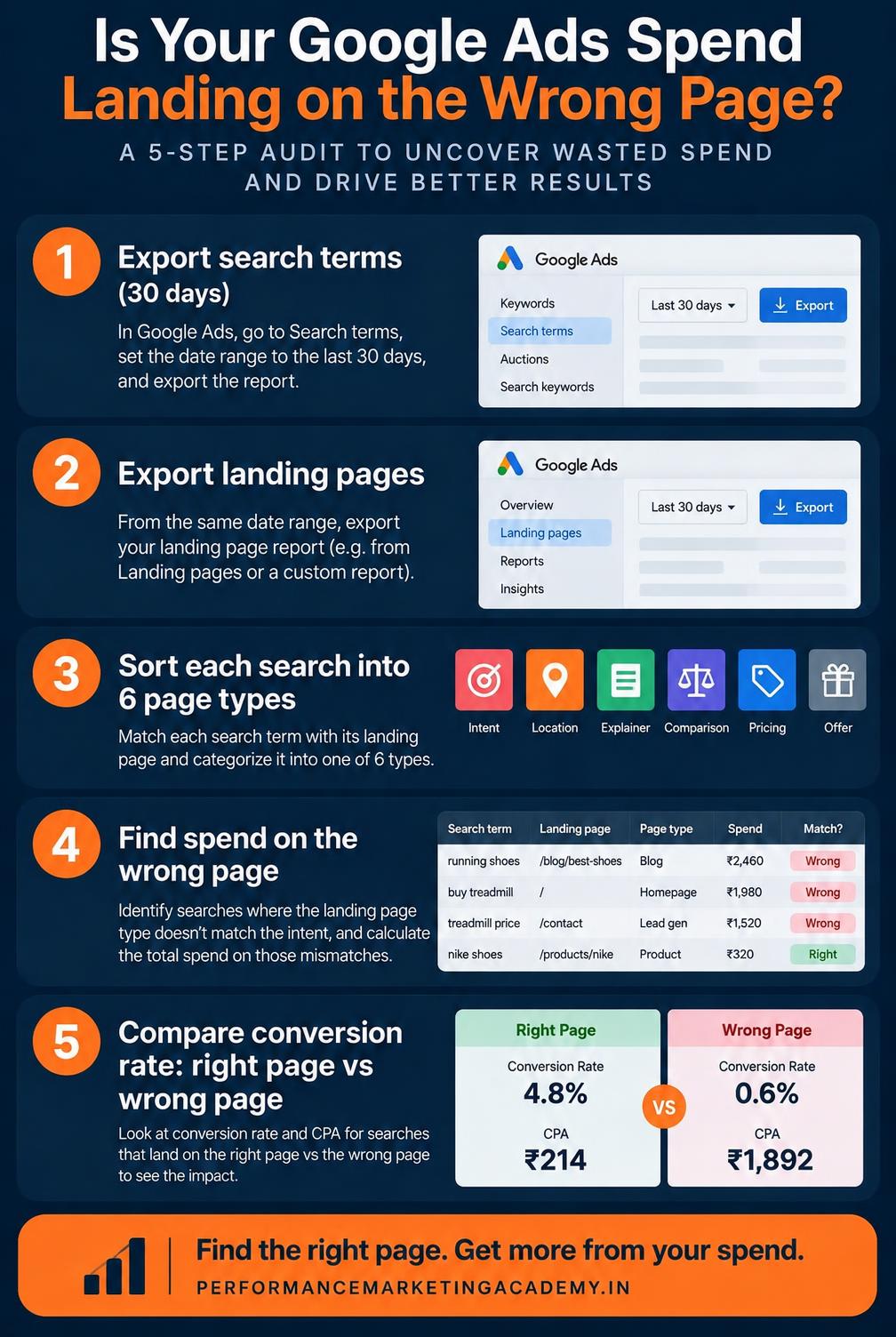
Step 1: Export your search terms (last 30 days)
In Google Ads go to Insights and reports → Search terms, set the date range to the last 30 days, and add the columns Campaign, Ad group, Clicks, Cost, Conversions. Download as CSV.
Step 2: Export your landing pages
Go to Insights and reports → Landing pages (or use the final URL column at keyword/ad level) and download the same date range. You now know which URL each ad group sends traffic to.
Step 3: Label every search with one of the 6 page types
Add a column called Intended page type. Use simple rules:
- Contains "near me", a city or area name → Location
- Contains "price", "cost", "fees", "how much", "charges" → Pricing
- Contains "vs", "alternative", "better than", "best" → Comparison
- Contains "signs", "symptoms", "how to", "why", "what is" → Explainer
- Contains "book", "appointment", "quote", "today", "call" → Offer
- Contains "for [audience]" or a specific benefit → Intent
Then add Actual page type — what the landing page really is.
Step 4: Total the wrong-page spend
Filter rows where intended and actual page types do not match. Sum their cost and conversions. Group by ad group so you can see which ones leak the most.
Step 5: Compare conversion rate on right vs wrong pages
Calculate conversion rate (conversions ÷ clicks) for matched rows and for mismatched rows. This uses your own numbers, not an industry benchmark — which makes the case for new pages far easier to explain to a client or boss.
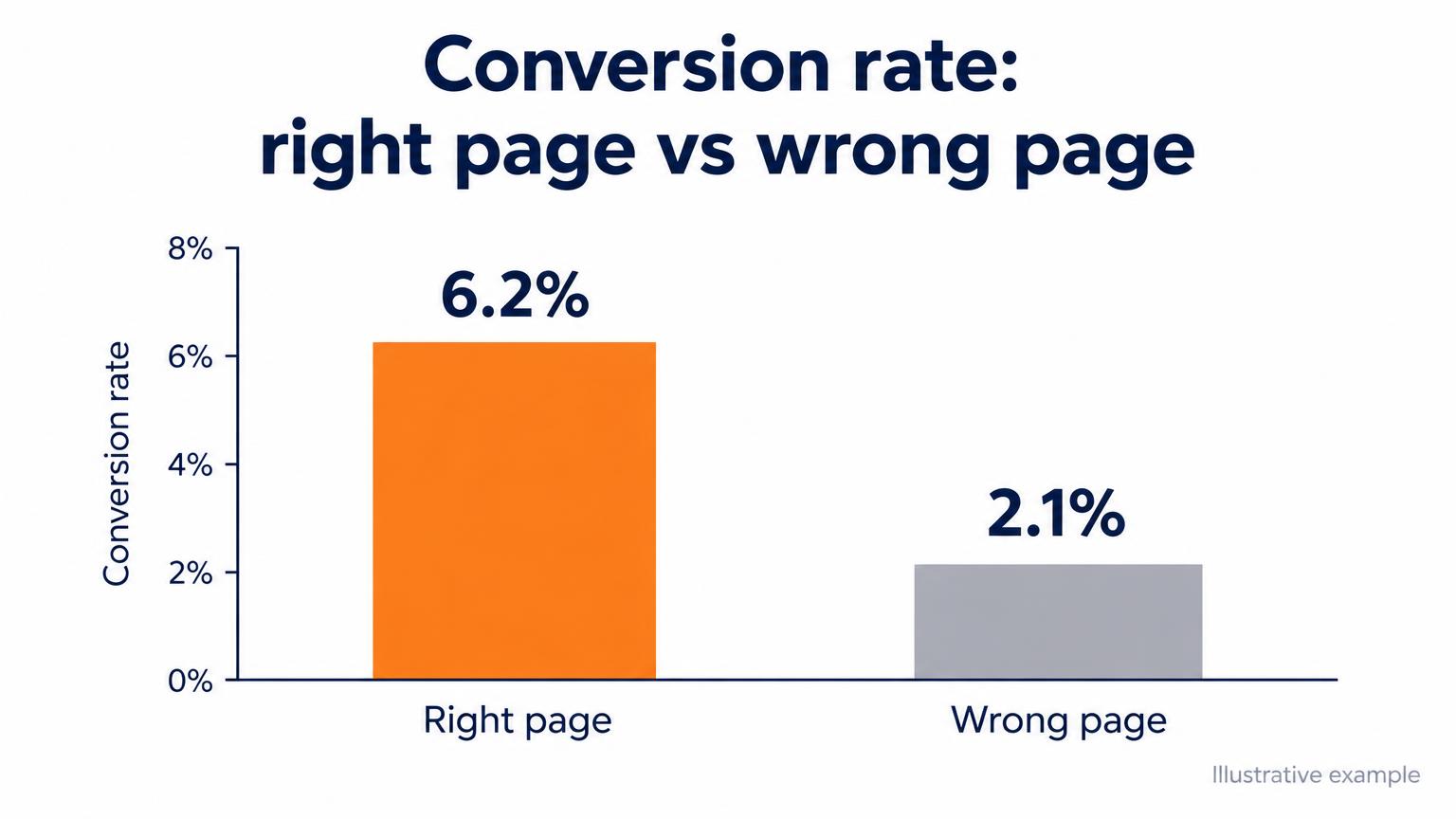
The chart above is illustrative; your figures will differ.
Illustrative example
| Page type intended | Spend on wrong page | Conversions | Lands on |
|---|---|---|---|
| Pricing | ₹18,400 | 3 | Homepage |
| Location | ₹9,600 | 5 | Service page |
| Comparison | ₹4,200 | 0 | Homepage |
| Explainer | ₹3,100 | 0 | Offer page |
Illustrative numbers only. In this example, building a proper pricing page and pointing the pricing ad group to it is clearly the first job.
Using Claude (or another AI assistant) to run the review in minutes
Labelling hundreds of search terms by hand is slow. This is exactly the kind of repeated, rule-based task where an AI assistant shines. You can write the rules once as a Claude Skill — see our guide to Claude skills for marketing — and reuse it every month.
A simple skill or prompt might say:
You are a landing page match reviewer for Google Ads. I will upload a search terms CSV and a landing pages CSV for the last 30 days. Classify every search term into one of six page types: Intent, Location, Explainer, Comparison, Pricing, Offer, using these keyword rules: [paste rules from Step 3]. Classify each landing page URL into the same types. Return: (1) a table of search terms with intended vs actual page type; (2) total cost and conversions on mismatched searches; (3) page types that receive no traffic at all; (4) the top 5 ad groups by mismatched spend; (5) conversion rate on matched vs mismatched searches. Show your calculations. Do not invent data.
Good practice:
- Use exports, not logins. You don't need to give any tool access to your account to do this.
- Remove personal data before uploading anything.
- Spot-check 20–30 rows; AI can mislabel unusual searches.
- It won't build the pages. The review shows where spend leaks and where to start. Building and testing the pages is still your job.
What to fix first
- Open the ad groups with the highest mismatched spend. One or two usually account for most of the leak.
- Build the missing page type — often Pricing or Location — and change those ad groups' final URLs.
- Split mixed ad groups. If one ad group catches both "price" and "book now" searches, separate them so each can point to the right page.
- Rewrite ad copy to match the page. A pricing ad should mention price; an offer ad should mention the offer.
- Add negatives for searches you don't want to pay for at all (for example "free" or "jobs" if irrelevant). Brush up on metrics like CPC, CPM and CTR as you go.
- Re-run the audit after 30 days and compare conversion rates.
Landing page basics that help every type
- Message match: the headline repeats the search and the ad.
- Speed: test on mobile with PageSpeed Insights; most Indian traffic is mobile.
- One clear action: one main button, repeated down the page.
- Proof: real reviews, numbers you can back up, photos of the real team or place.
- Tracking: set up conversion tracking so you can measure which page wins — see our conversion tracking guide.
For page-building ideas see our SaaS landing page guide and what a sales funnel is.
A 30-day plan
| Week | Task |
|---|---|
| Week 1 | Export reports, label searches, total wrong-page spend |
| Week 2 | Build the top missing page (usually Pricing or Location) |
| Week 3 | Split ad groups, update final URLs and ad copy |
| Week 4 | Compare conversion rates; plan the next page type |
Learn Google Ads and landing pages with PMAcademy
Matching searches to pages is a core skill for any Google Ads specialist — and a strong talking point in interviews. If you want hands-on practice:
- Performance Marketing Course — 6 weeks of Google Ads, Meta Ads, conversion tracking, landing pages and reporting.
- AI Digital Marketing Course — 8 weeks including landing-page creation with AI and ChatGPT Ads.
- ChatGPT Ads Manager Course — use AI assistants to plan and review campaigns.
Join the free live masterclass to ask questions — see current batches. Looking for work? Read about Google Ads jobs in India.
The bottom line
One page can't answer every search. Sort your searches into six page types, measure how much spend lands on the wrong page, and fix the biggest leak first. Start with your own 30-day exports — the numbers will tell you exactly which page to build next.
Glossary
- Landing page
- The page a person reaches after clicking your ad.
- Search intent
- What the person actually wants when they type a search: to learn, compare, check a price or buy now.
- Search terms report
- A Google Ads report showing the real searches that triggered your ads, with clicks, cost and conversions.
- Landing page experience
- Google's estimate of how relevant and useful your landing page is to people who click your ad; one of the three Quality Score components.
- Quality Score
- A 1–10 diagnostic score per keyword based on expected CTR, ad relevance and landing page experience.
- Conversion rate (CVR)
- Conversions divided by clicks, shown as a percentage.
- Wrong-page spend
- Money spent on clicks whose search intent did not match the page they landed on.
- Ad group
- A set of related keywords and ads inside a campaign that usually share one final URL.
- CRO
- Conversion rate optimisation — improving pages so more visitors take the action you want.
Sources & Further Reading
Frequently Asked Questions
What is a landing page in Google Ads?+
It is the page people reach after clicking your ad, set by the final URL of the ad or keyword. It should continue the exact promise of the search and the ad, and make the next step obvious.
Can I use my homepage as a Google Ads landing page?+
You can, and it works for brand searches and people ready to contact you. But homepages try to speak to everyone, so people comparing options, checking prices or researching a problem often leave. Matching those searches to dedicated pages usually converts better.
How many landing pages do I need for Google Ads?+
Start with the page types where you spend the most on mismatched searches — often a pricing page and one intent page. You do not need all six on day one. Add pages as the search terms report shows real demand.
What are the 6 types of landing pages for Google search?+
Intent pages (service for an audience), Location pages (service near me / in a city), Explainer pages (signs of or how to fix a problem), Comparison pages (competitor alternative), Pricing pages (cost / how much) and Offer pages (book or get a quote now).
How do I find which searches land on the wrong page?+
Export the search terms report and landing page report for the last 30 days, label each search with one of the six page types, compare it with the page it actually landed on, then total the cost and conversions for mismatches. An AI assistant can do the labelling quickly; spot-check its work.
Does the landing page affect Quality Score?+
Yes. Landing page experience is one of the three Quality Score components, along with expected CTR and ad relevance. Relevant, fast, easy-to-use pages help, and Google uses Quality Score signals in ad rank.
Can Claude or ChatGPT audit my Google Ads landing pages?+
Yes, if you give them exported reports. Write the six page types and your rules as a reusable instruction (a Claude Skill or a custom GPT) and it will sort searches, total wrong-page spend and list ad groups to fix. Remove personal data before uploading and verify the results.
What should a pricing landing page include?+
A clear price or price range, what is included, payment or EMI options, a comparison of plans, honest FAQs and one call to action. Hiding the price on a page that targets 'how much is' searches is the most common reason those clicks bounce.
Join our live training program and become a performance marketing professional.