Claude Skills for Marketing (2026): 21 Skills for Google Ads, Meta Ads, SEO & AI Search
What Claude Skills are, how to build and install one, and 21 ready-to-copy marketing skill ideas for Google Ads, Meta Ads, budget pacing, landing pages, SEO, AI search visibility and weekly reporting — with rules, thresholds and examples for Indian ad accounts.

- 01What are Claude Skills?
- 02Why marketers should write their rules down
- 03Anatomy of a good marketing skill
- 04How to create and install a Claude Skill: 5 steps
- 0521 Claude Skills for marketing (with rules)
- 06Setting thresholds for Indian ad accounts
- 07Limits and good practice
- 08Learn AI-powered performance marketing with PMAcademy
- 09The bottom line
We'll email you our Performance Marketing Setup Checklist instantly.
No spam. Unsubscribe anytime.
Most marketers already know the rules that keep an ad account healthy: cut search terms that burn money, refresh tired creatives, keep budgets on plan, make sure the landing page matches the ad. The problem is not knowledge — it is that the rules live in someone's head and get applied differently every week.
Claude Skills fix that. You write each rule down once, as a small instruction file, and Claude applies it the same way every time you ask. This guide explains what Claude Skills are, how to build one step by step, and gives you 21 practical marketing skill ideas across Google Ads, Meta Ads, budgets, landing pages, SEO, AI search and reporting.
What are Claude Skills?
A Claude Skill is a folder that contains a file called SKILL.md, plus optional reference documents, templates or scripts. The top of the file has a short name and description. Claude scans these descriptions and loads the full instructions only when your request matches — so you can install dozens of skills without filling every conversation with them.
Think of it like onboarding a new team member. Instead of explaining "how we audit search terms" every Monday, you hand them a one-page SOP once. A skill is that SOP, written for an AI.
| Normal prompt | Claude Skill | |
|---|---|---|
| Where the rules live | Typed into each chat | Saved once in a file |
| Consistency | Changes with every prompt | Same rules every time |
| Team sharing | Copy-paste | Share one folder |
| Best for | One-off questions | Repeated weekly tasks |
Why marketers should write their rules down
- Consistency: the same thresholds are applied whether it's Monday or the 30th, whether you or a junior runs the check.
- Speed: a 45-minute manual audit becomes a 5-minute review of flagged items.
- Training: new team members learn your standards by reading the skills.
- Fewer expensive misses: wasted spend, overspending budgets and broken landing pages get flagged early.
None of this is hard. Most teams simply never write the rules down.
Anatomy of a good marketing skill
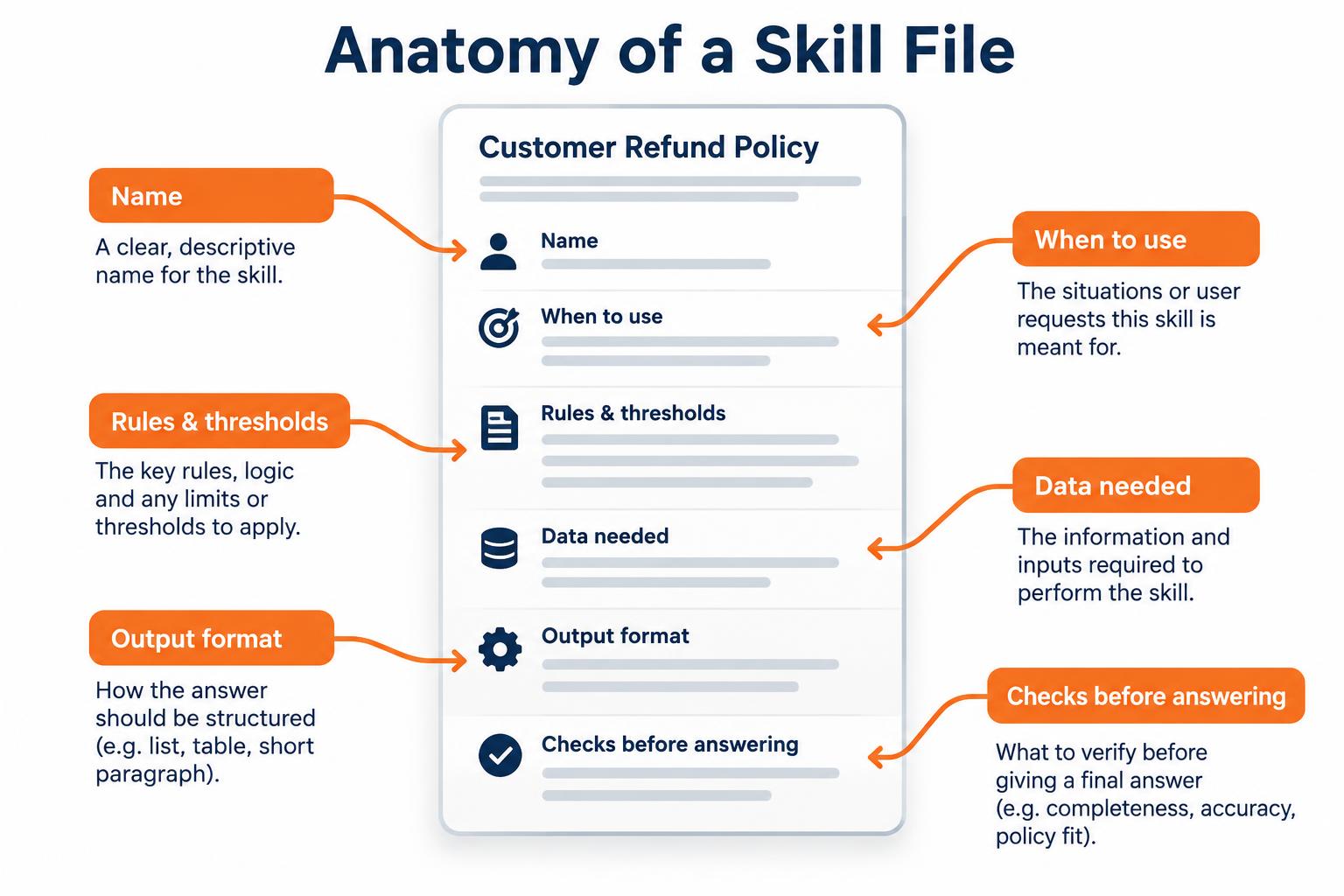
Every strong skill answers six questions:
- Name — short and clear, e.g.
wasted-spend-finder. - When to use — the description Claude reads to decide whether to load it ("Use when the user shares a Google Ads search terms report and asks about wasted spend or negative keywords").
- Rules and thresholds — exact numbers, not vague advice.
- Data needed — which report, which columns, which date range.
- Output format — a table, a negative keyword list, a one-page summary.
- Checks before answering — e.g. "If the date range is under 14 days, warn that data may be too thin."
Sample SKILL.md (copy and adapt)
---
name: wasted-spend-finder
description: Use when the user shares a Google Ads search terms report
  and wants to find wasted spend or build a negative keyword list.
---

# Wasted Spend Finder

## Data needed
Search terms report (CSV) with: Search term, Campaign, Ad group,
Match type, Clicks, Cost, Conversions. Minimum 30 days.

## Rules
1. Flag every search term with Cost >= ₹1,500 and Conversions = 0.
2. Flag terms with Cost >= ₹500, Conversions = 0 and an irrelevant
   intent word (free, job, salary, pdf, meaning, course for unrelated products).
3. Never flag brand terms or terms with conversions in the last 90 days.

## Output
1. Table: term, campaign, cost, clicks, reason flagged.
2. Suggested negatives grouped as exact / phrase, with match type.
3. Total spend that would have been saved.

## Checks
- If data covers fewer than 30 days, say results may be unreliable.
- Do not recommend pausing campaigns; only suggest negatives for review.
(The ₹ thresholds here are illustrative. Set them from your own average CPA — a common starting point is 1–1.5× your target CPA.)
How to create and install a Claude Skill: 5 steps
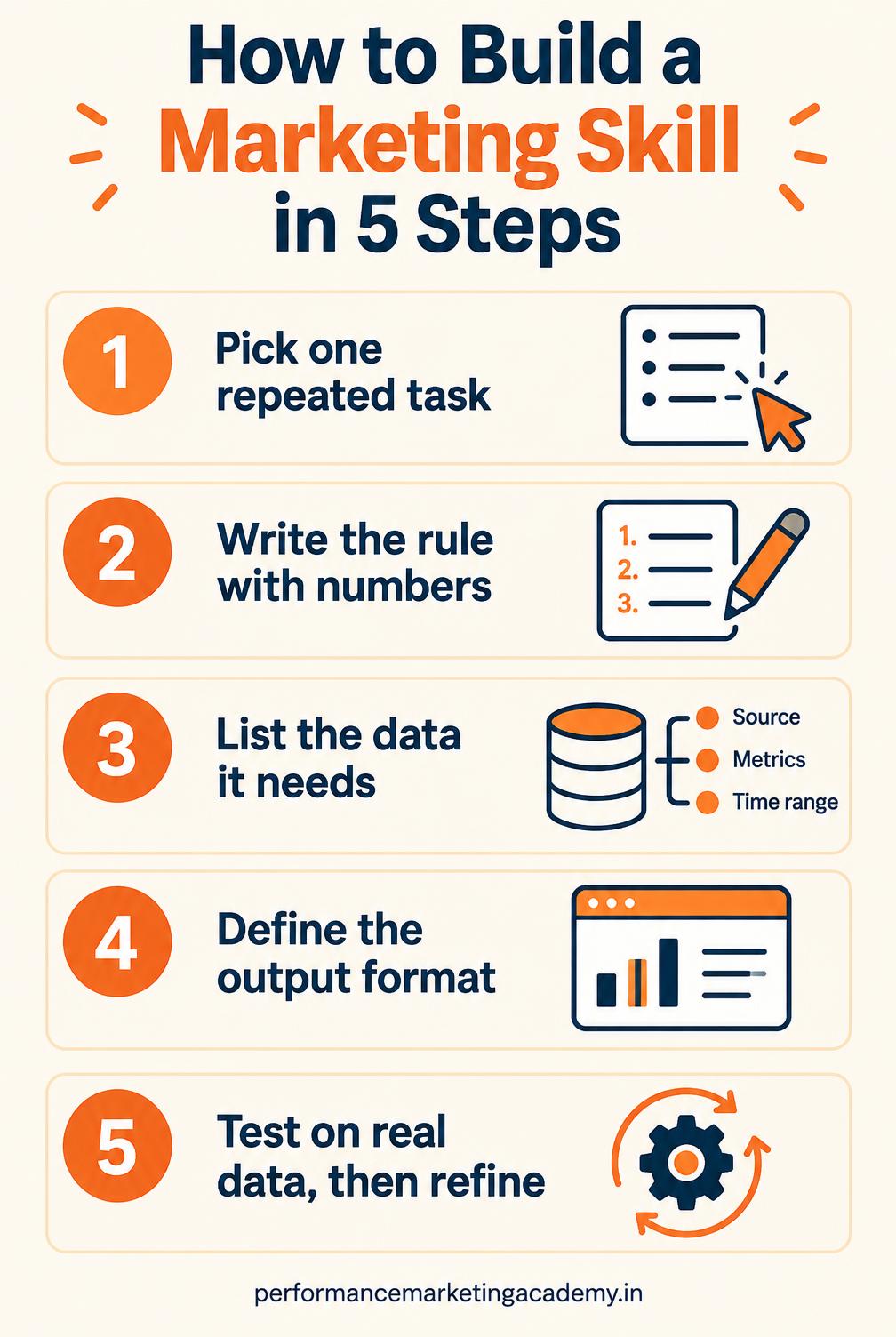
- Pick one repeated task. Choose something you do weekly that costs money when missed.
- Write the rule with numbers. "High spend" is vague; "₹1,500+ spend with zero conversions in 30 days" is a rule.
- List the data it needs. Name the exact report and columns, so anyone can export it.
- Define the output format. Decide what a useful answer looks like before Claude writes one.
- Test on real data, then refine. Run it on last month's export, compare with what you would have flagged manually, and adjust thresholds.
To install, save the folder (SKILL.md plus any reference files), zip it if your Claude app asks for an upload, and enable it under Skills in settings. In Claude Code, place the folder in your skills directory. Then simply ask: "Here is my search terms report for October — find wasted spend."
21 Claude Skills for marketing (with rules)
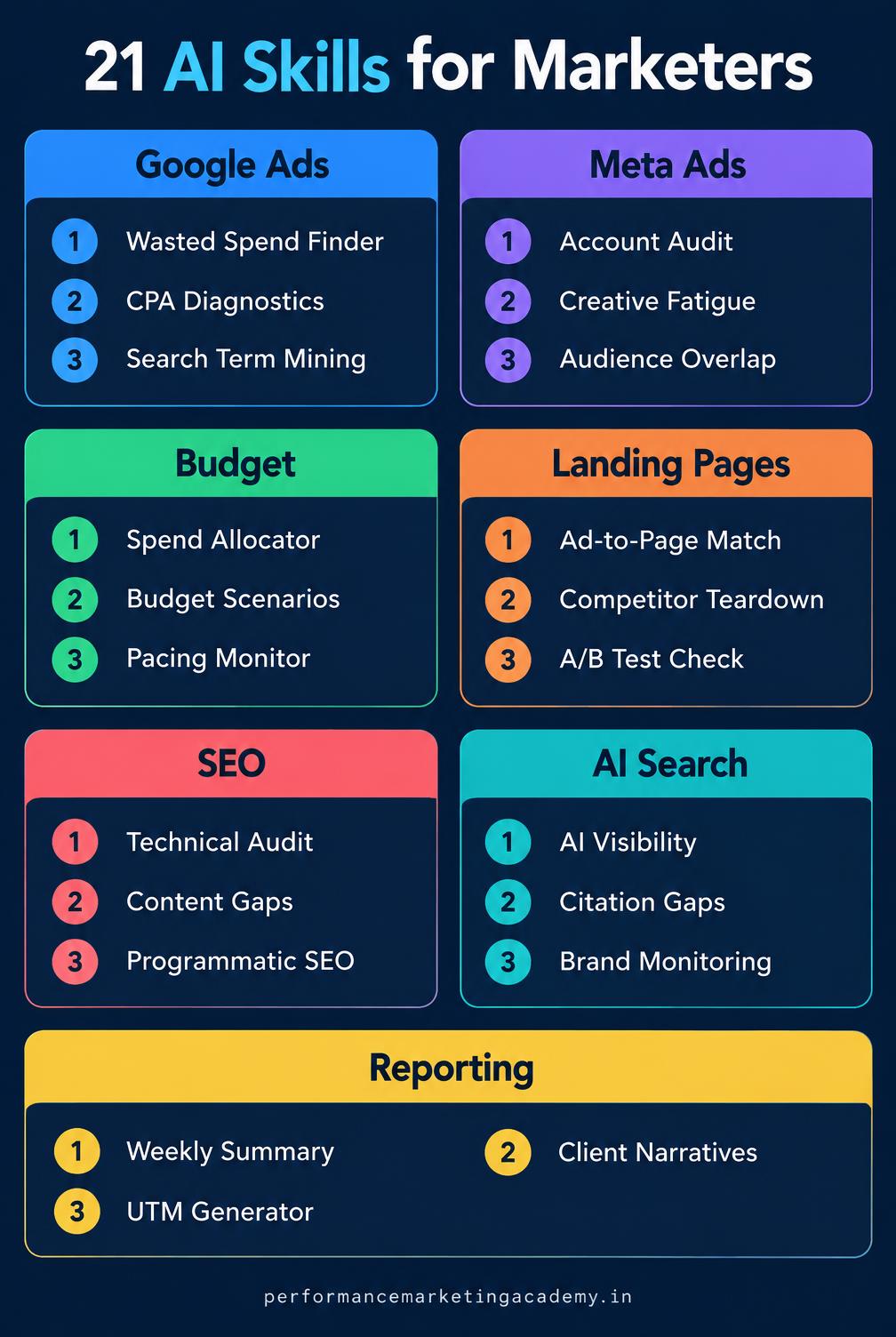
Below are 21 skill ideas in seven groups. Each has what it does and a starting rule you can put in the SKILL.md. Rupee values are illustrative — tune them to your account size and CPA.
I. Google Ads skills
| # | Skill | What it checks | Starting rule |
|---|---|---|---|
| 1 | Wasted Spend Finder | Irrelevant, non-converting search terms | Cost ≥ ₹1,500 and 0 conversions in 30 days → suggest negative |
| 2 | CPA Diagnostics | Why CPA changed week on week | Break the change into CPC, CTR and conversion rate; name the biggest driver |
| 3 | Search Term Mining | New keywords and negatives | Terms with 2+ conversions not yet added as keywords → suggest exact match |
The Wasted Spend Finder alone often pays for the time you spend setting skills up: the negative keyword list is ready before you even open the account. Pair it with our Google Ads interview questions guide if you are learning the fundamentals.
II. Meta Ads skills
| # | Skill | What it checks | Starting rule |
|---|---|---|---|
| 4 | Meta Ads Account Audit | Account setup and structure | Check pixel/Conversions API events, campaign objective, ad sets with tiny budgets, overlapping placements |
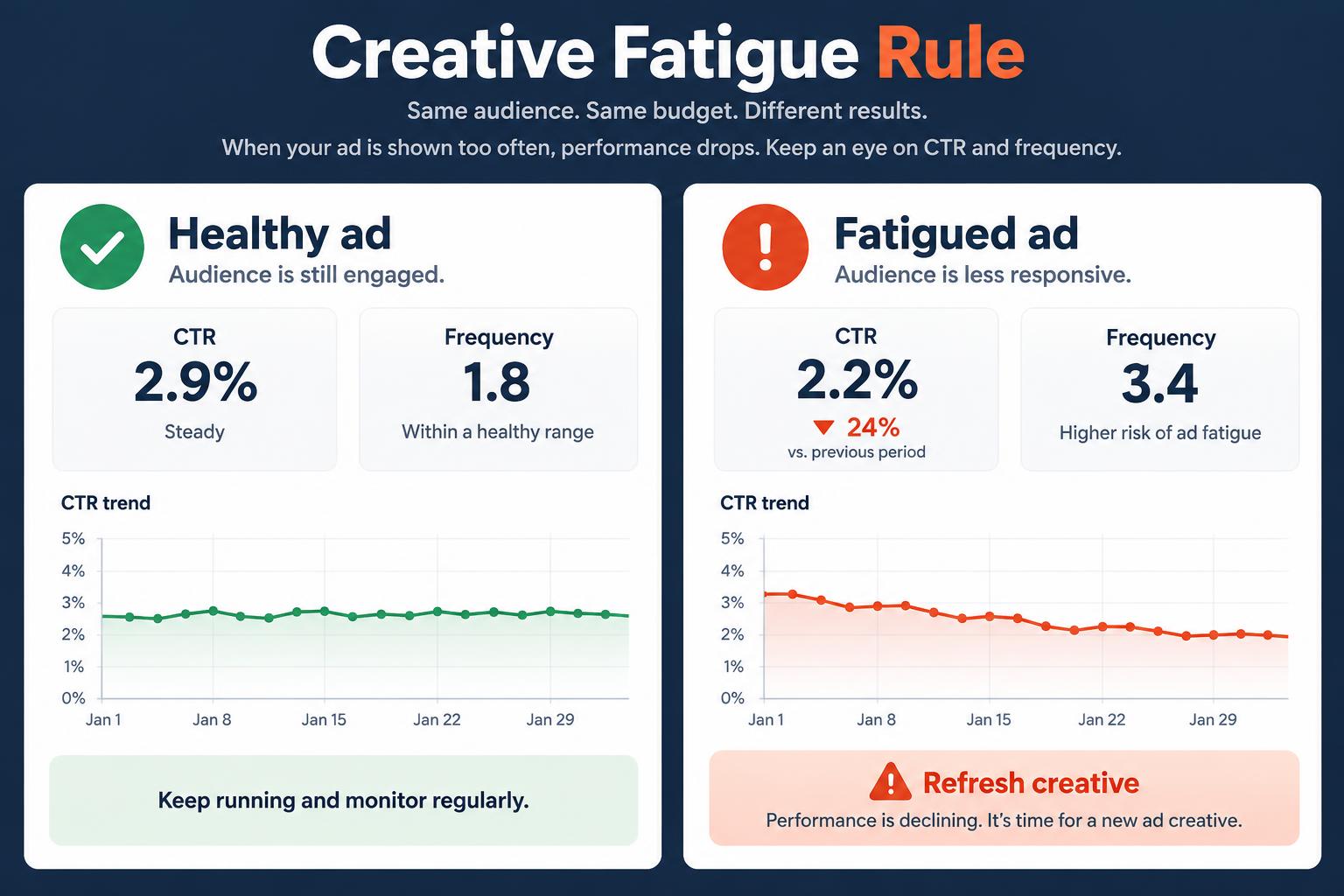
| 5 | Creative Fatigue | Declining ads | CTR down 20%+ vs previous 7 days or frequency above 3 → refresh creative |
| 6 | Audience Overlap | Ad sets competing with each other | Same interests/lookalikes across ad sets in one campaign → suggest consolidating |
Creative fatigue is the classic silent budget killer. By flagging CTR drops and rising frequency, you refresh creatives before cost per lead starts climbing. Learn the full workflow in our Facebook Ads guide and research competitor creatives with the Meta Ads Library.
III. Budget skills
| # | Skill | What it checks | Starting rule |
|---|---|---|---|
| 7 | Ad Spend Allocator | Where to shift budget | Rank campaigns by CPA/ROAS vs target; suggest moving 10–20% from worst to best |
| 8 | Budget Scenarios | What happens if spend changes | Model +20% / –20% spend using recent CPA, and warn that CPA usually rises as spend scales |
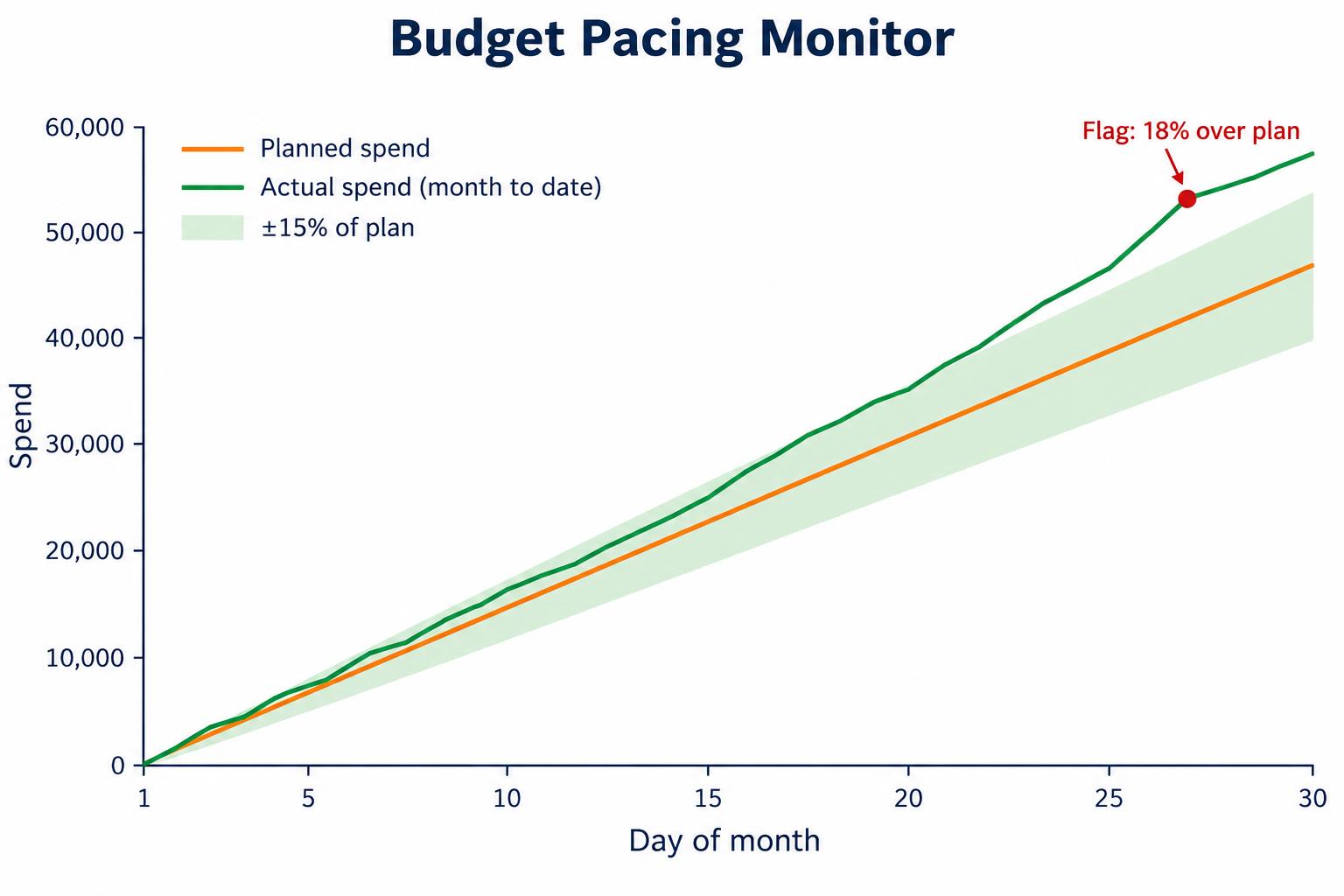
| 9 | Pacing Monitor | Month-to-date spend vs plan | Expected spend = monthly budget × (day ÷ days in month); flag if actual is 15%+ off |
A daily pacing check catches overspend or underspend weeks before the month closes — far better than discovering it in the monthly report.
IV. Landing page skills
| # | Skill | What it checks | Starting rule |
|---|---|---|---|
| 10 | Landing Page Audit | Ad-to-page match | The headline repeats the ad's main promise; the offer, price and CTA match; the form is above the fold on mobile |
| 11 | Competitor Teardown | Competing offers | Compare offer, proof, price, guarantee and CTA on 3 competitor pages in one table |
| 12 | A/B Test Analyzer | Test results | Don't declare a winner until each variant has enough conversions and the test has run at least one full week |
If the page doesn't match the ad and the search intent, more clicks just mean more waste. Fix the mismatch first — our SaaS landing page guide and sales funnel guide explain what a good page needs.
V. SEO skills
| # | Skill | What it checks | Starting rule |
|---|---|---|---|
| 13 | Technical Audit | Site issues | Missing titles/descriptions, broken links, non-indexable pages, slow pages, missing sitemap entries |
| 14 | Content Gaps | Missing topics | Keywords competitors rank top 20 for that your site doesn't rank for → group into article ideas |
| 15 | Programmatic SEO | Page templates | Plan one template (e.g. "course in [city]") only when each page can have genuinely unique, useful content |
Content Gaps means your next articles come from real gaps, not guesses. Feed it exports from your SEO tool and Google Search Console. See SEO vs AEO vs GEO for how search is changing.
VI. AI search skills
| # | Skill | What it checks | Starting rule |
|---|---|---|---|
| 16 | AI Visibility Audit | Which brands AI assistants recommend | Ask the same 10–20 buyer questions in ChatGPT, Claude and Gemini; record brands named and their order |
| 17 | Citation Gaps | Missing sources | List the websites AI answers cite; mark the ones that don't mention your brand as outreach or content targets |
| 18 | Brand Monitoring | Answer changes | Re-run the same questions monthly; flag when your brand drops out or a competitor appears |
AI answers are becoming a new "search result". An AI visibility skill shows you exactly who gets named instead of you. AI answers vary between runs, so look at patterns across repeated checks rather than a single answer.
VII. Reporting skills
| # | Skill | What it checks | Starting rule |
|---|---|---|---|
| 19 | Weekly Account Summary | Spend, CPA, ROAS on one page | Show this week vs last week; explain the top 3 changes and their likely cause |
| 20 | Client Report Narratives | Monthly update | Plain-language summary: results, what we changed, what we learned, next month's plan |
| 21 | UTM Tracking Generator | Consistent naming | lowercase only; utm_source = platform, utm_medium = cpc/paid_social/email, utm_campaign = product_offer_month |
A good weekly summary doesn't just list numbers — it explains what moved and why. Brush up on the metrics with CPC, CPM and CTR explained and the ROAS formula.
Setting thresholds for Indian ad accounts
Copying someone else's "$20 spend" rule rarely fits. Base your thresholds on your own numbers:
| Rule | How to set it | Illustrative example |
|---|---|---|
| Wasted spend | 1–1.5× target CPA | Target CPA ₹1,000 → flag at ₹1,000–₹1,500 with 0 conversions |
| Creative fatigue | CTR drop vs your 7-day average | Flag at 20%+ drop or frequency above 3 (cold audiences) |
| Pacing | Percentage off plan | Flag at 15%+ for big budgets; 25% for small daily budgets that swing more |
| Scaling | Step size | Raise budgets 15–20% at a time and recheck CPA after 3–4 days |
Small accounts need longer date ranges before a rule is meaningful — with ₹300 a day, one week of data can be pure noise.
Limits and good practice
- Check every output. AI can misread a column or make an arithmetic slip. Spot-check flagged rows against the original report.
- Protect data. Remove names, phone numbers and emails before uploading. Follow client contracts and privacy law.
- Keep humans in charge of changes. Let skills recommend; you approve budget, bid and pause decisions.
- Version your skills. When you change a threshold, note why — it keeps the team aligned.
- Don't over-automate strategy. Offers, positioning and creative ideas still need marketing judgement.
Learn AI-powered performance marketing with PMAcademy
Skills are only as good as the marketer writing the rules. To learn the Google Ads, Meta Ads, tracking and AI workflows behind these checks:
- AI Digital Marketing Course — 8 weeks of AI-powered marketing, including ChatGPT Ads, landing pages, ads and WhatsApp marketing.
- Performance Marketing Course — 6 weeks of hands-on Google Ads, Meta Ads, conversion tracking and reporting.
- ChatGPT Ads Manager Course — learn to plan and run ads with AI assistants.
Not sure where to start? Join the free live masterclass and ask your questions directly — see current batches. You can also read the best AI tools for digital marketing and what AI in digital marketing means.
The bottom line
Claude Skills turn the rules you already know into repeatable, consistent checks. Start with one skill that saves money every week — usually a wasted spend finder or a pacing monitor — test it on real exports, tune the thresholds to your account, and add the next. Write the rules down once, and let AI do the repetitive part while you focus on strategy.
Related: see how to match every search to the right page in our Google Ads landing page guide.
Glossary
- Claude Skill
- A reusable folder of instructions (SKILL.md) and optional files that Claude loads when a request matches its description.
- SKILL.md
- The main file of a skill. It starts with a name and description, followed by the steps, rules and output format Claude should follow.
- Threshold
- A number that triggers an action, such as spend above ₹1,500 with zero conversions or frequency above 3.
- Wasted spend
- Ad budget spent on search terms, placements or audiences that produced no conversions.
- Creative fatigue
- When the same audience sees an ad too often, so CTR drops and cost per result rises.
- Pacing
- Comparing month-to-date spend with the planned spend for the same date to see if a budget is running too fast or too slow.
- Content gap
- A topic your competitors rank for in search that your site does not cover.
- AI visibility
- How often a brand is named or cited when people ask AI assistants like ChatGPT, Claude or Gemini for recommendations.
- UTM parameters
- Tags added to a URL (utm_source, utm_medium, utm_campaign) so analytics can tell where a visit came from.
Sources & Further Reading
Frequently Asked Questions
What are Claude Skills?+
Claude Skills are reusable instruction packages made by Anthropic for Claude. Each skill is a folder with a SKILL.md file (and optionally reference documents or scripts). Claude reads the short description of every installed skill and loads the full instructions only when your request matches, so you can install many skills without cluttering every chat.
Do I need coding knowledge to create a Claude Skill?+
No. A basic marketing skill is just a well-written text file: a name, a description of when to use it, the rules with numbers, the data it needs and the output format. Coding helps only if you want the skill to run scripts, for example to calculate statistics on a large CSV.
How do I install a skill in Claude?+
In the Claude apps you can enable Skills in settings and upload a skill as a zipped folder; in Claude Code you place the skill folder in your skills directory; developers can also attach skills through the API. Menus change often, so follow Anthropic's current Skills documentation for exact steps.
Can Claude Skills connect directly to my Google Ads or Meta Ads account?+
A skill by itself is only instructions. Claude works on the data you give it: exported CSV reports, screenshots, or data from a connector/integration you have authorised. Start with exports — they are safer and easier to check.
Which marketing skill should I build first?+
Start with the task you repeat every week and that costs money when missed. For most ad accounts that is a wasted-spend finder (search terms with spend and no conversions) or a budget pacing check. Build one, test it on last month's data, then add the next.
Are Claude Skills only for Claude?+
Skills are a Claude feature, but the idea — writing your rules down as a reusable instruction file — works with other AI assistants too. You can paste the same rules into a ChatGPT custom GPT or a Gemini Gem, although the format and loading behaviour differ.
Is it safe to upload client data to an AI tool?+
Only share data you are permitted to share under your client agreements and privacy laws. Remove personal information such as names, phone numbers and emails, use business or team plans with appropriate data controls where available, and never upload passwords or payment details.
Will AI skills replace performance marketers?+
No. Skills automate repetitive analysis, but deciding strategy, writing offers, judging creative and taking responsibility for budgets still needs a skilled marketer. People who can write good rules and check AI output become more valuable. Read our guide on [whether AI will replace digital marketers](/blog/will-ai-replace-digital-marketers).
Join our live training program and become a performance marketing professional.